Our Community is in read-only mode until April 8th, learn more here. You can still search existing threads or get help via Dropbox Support, the Dropbox Help Center, or Learn.
Forum Discussion

monerap
7 years agoExplorer | Level 4
How to turn off link previews on Paper?
Hello everyone,
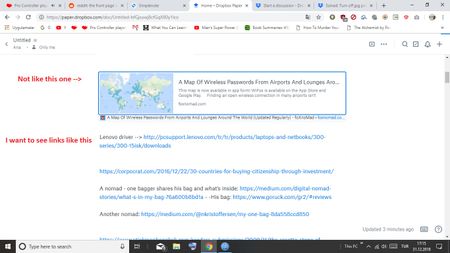
I created a doc called "links". When I copy my links to doc, I want to see only URLs, not thumbnails. Is this possible?
- 7 years ago
Not at the moment Bradloff - I'll be passing this on to our team though for their consideration. Thanks so much for your valuable feedback and helping us improve Paper!
In the meantime, you can use a code block [by entering three backticks (```) to start, and then paste your URL into the block] to paste your links into a Paper doc as text only.
I know it's not optimal yet I sure hope it helps to some extent.
Let me know if you have any more questions or feedback and happy new Year too!

Walter Dropbox Community Moderator
6 years agoDropbox Community ModeratorThanks for your input on this fffoooxxx - I'm logging this is a feature request for an option to be able to disable/enable link previews on Paper docs.
I'll also let the team know about your usecase as this will help better understand our users' needs and pain points - thanks for your constructive feedback.
If there's anything else you'd like to add, or ask, in the meantime; please let me know.
WalterDropbox Community Moderator
6 years agoDropbox Community ModeratorFollowing up on this one...
You can also use the 'Undo' command (ctrl+Z for Windows and Command+Z for Macs) when you paste the link(s) on a Paper doc to prevent them from previewing.
I was just able to do it even when pasting multiple links - only I had to press the command as many times as the listed links.
Hope this helps!
About View, Download, and Export

Get support with viewing, downloading, and exporting files and folders from your Dropbox account.
The Dropbox Community team is active from Monday to Friday. We try to respond to you as soon as we can, usually within 2 hours.
If you need more help you can view your support options (expected response time for an email or ticket is 24 hours), or contact us on X, Facebook or Instagram.
For more info on available support options for your Dropbox plan, see this article.
If you found the answer to your question in this Community thread, please 'like' the post to say thanks and to let us know it was useful!


