Our Community is in read-only mode until April 8th, learn more here. You can still search existing threads or get help via Dropbox Support, the Dropbox Help Center, or Learn.
Forum Discussion

monerap
7 years agoExplorer | Level 4
How to turn off link previews on Paper?
Hello everyone,
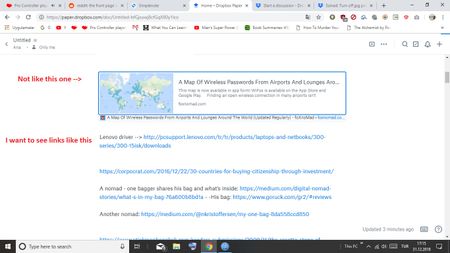
I created a doc called "links". When I copy my links to doc, I want to see only URLs, not thumbnails. Is this possible?
- 7 years ago
Not at the moment Bradloff - I'll be passing this on to our team though for their consideration. Thanks so much for your valuable feedback and helping us improve Paper!
In the meantime, you can use a code block [by entering three backticks (```) to start, and then paste your URL into the block] to paste your links into a Paper doc as text only.
I know it's not optimal yet I sure hope it helps to some extent.
Let me know if you have any more questions or feedback and happy new Year too!


Ben O.
6 years agoHelpful | Level 6
Appreciate the idea, but I just stopped using Paper in favor of Apple’s native notes app. I’m tired of hearing Dropbox’s excuses for awful UX, especially when they choose to spend money on terrible UI overhauls and embarrassing marketing campaigns rather than fixing the problems reported by paying customers. I’d love to dump Dropbox entirely, but, unfortunately I haven’t found a better alternative. Drive is good, but Google is evil, so I wouldn’t even consider their products.

no108
6 years agoNew member | Level 2
Is it possible to get this fixed? This is very annoying to work with, should be an option. Many other services that add link previews allow you to turn it off, eg Slack.
About View, Download, and Export

Get support with viewing, downloading, and exporting files and folders from your Dropbox account.
The Dropbox Community team is active from Monday to Friday. We try to respond to you as soon as we can, usually within 2 hours.
If you need more help you can view your support options (expected response time for an email or ticket is 24 hours), or contact us on X, Facebook or Instagram.
For more info on available support options for your Dropbox plan, see this article.
If you found the answer to your question in this Community thread, please 'like' the post to say thanks and to let us know it was useful!


