Our Community is in read-only mode until April 8th, learn more here. You can still search existing threads or get help via Dropbox Support, the Dropbox Help Center, or Learn.
Forum Discussion

FrankSmeets
1 month agoExplorer | Level 3
I can't access or download my local files in my Dropbox folder
Device HP Spectre x360 Convertible 13-w0XX Operating System/Browser (if using the web) Windows 10 Dropbox App Version/Browser Version (240.4.8609)/(Firefox 147.0.2 - 64 bits, Google-Chrome) ...

FrankSmeets
1 month agoExplorer | Level 3
Hi Jay , thanks for your message.
I followed your instruction with the desktop application, which somehow aborted functioning.
It's syncing now (few hours left to complete according to the indicator).
After that I will check if I can re-access the files that are somehow blocked and come back on this.
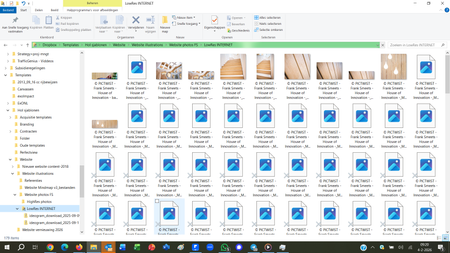
Regarding the above screenshot: you can see that windows explorer is trying to "open" files one by one, and most of -in this case photos- are not accessible (just pictogram with an X). So I can find documents, but have no access (If I open a word document that apparently doesn't have access, Word completely blocks: "Word does not react", and has to be hard-stopped, or I have to wait for the laptop to come to the conclusion that the file cannot be opened.
Hope this will be solved with the actual syncing
- Jay1 month ago
Dropbox Community Moderator
Thanks for the update. Once the Dropbox desktop application has finished syncing, I want you to try to make these files available offline by following these steps.
This will ensure that the files are physically on your machine, in order to test if they open correctly.
- Megan1 month ago
Hey FrankSmeets!
Just popping in to see if you've had a chance to look at our last message. Still need help? We're all ears! If the issue is sorted, let us know what worked out for you.


About View, Download, and Export

Get support with viewing, downloading, and exporting files and folders from your Dropbox account.
The Dropbox Community team is active from Monday to Friday. We try to respond to you as soon as we can, usually within 2 hours.
If you need more help you can view your support options (expected response time for an email or ticket is 24 hours), or contact us on X, Facebook or Instagram.
For more info on available support options for your Dropbox plan, see this article.
If you found the answer to your question in this Community thread, please 'like' the post to say thanks and to let us know it was useful!


