We’re Still Here to Help (Even Over the Holidays!) - find out more here.
Forum Discussion

juanzorz
2 years agoExplorer | Level 3
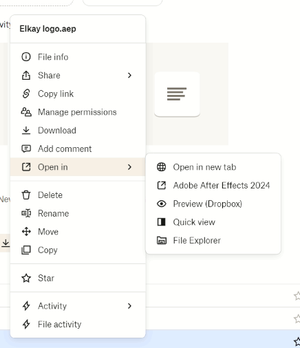
I no longer see the "Open in > File Explorer" option on the Dropbox website.
Hi, I use the dropbox browser version to find files faster and then, I was also able to open/find in location whatever file I needed by right clicking it in-browser and clicking on "Open in\ ...

juanzorz
2 years agoExplorer | Level 3
Hello
No the team admin has not made any changes on our settings, yes my friend is on the same business team, I asked two more and one of them has the same problem as me and another one doesn't
So far me + person B have the issue
Then we have the team account (Person A) + Person C who can still use the show in file explorer function

Здравко
2 years agoLegendary | Level 20
Hi juanzorz,
Try figure out if something prevents opening network port on 127.0.0.1:17600 and/or prevents browser access to there. Dropbox application while running listens on there. When you open Dropbox site, it tries connect there (so the page recognize running application) and if the connection is unsuccessful, the site assumes no local application runs and removes all local handlers (including Open in File Explorer). Typical "guilty" is some security software or similar. Check network limitations settings on all similar tools on your machine.
Good luck.
About View, download, and export

Need support with viewing, downloading, and exporting files and folders from your Dropbox account? Find help from the Dropbox Community.
The Dropbox Community team is active from Monday to Friday. We try to respond to you as soon as we can, usually within 2 hours.
If you need more help you can view your support options (expected response time for an email or ticket is 24 hours), or contact us on X, Facebook or Instagram.
For more info on available support options for your Dropbox plan, see this article.
If you found the answer to your question in this Community thread, please 'like' the post to say thanks and to let us know it was useful!


