2025 sparked some incredible conversations across our community 👩💻. Discover the highlights and see what’s ahead in 2026.
Forum Discussion

Aaron Ferrucci
4 years agoExplorer | Level 3
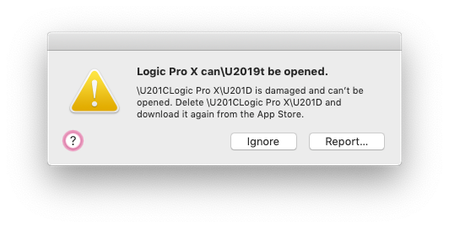
Logic Pro download corrupted files
Hi there, Using dropbox to sync my Logic Pro projects in real-time. Uploaded multiple to 'online-only' and then used smart sync to shift them to 'local' as I needed to work on some old files but I'm ...

Jay Dropbox Community Moderator
4 years agoDropbox Community ModeratorHi Aaron Ferrucci, thanks for messaging the Community!
Does this occur for any Logic Pro file you're trying to open, even file test files?
Do you always mark those files as local first before opening them on your machine?
This will help me to assist further!
Does this occur for any Logic Pro file you're trying to open, even file test files?
Do you always mark those files as local first before opening them on your machine?
This will help me to assist further!

mrbmusic
3 years agoExplorer | Level 4
I'm having the same problem! can anyone help me with restoring logicx files?
- Hannah3 years ago
Hey mrbmusic, thanks for the nudge here and sorry to see you're having trouble.
Can you give us a few more details about your issue?
Are you getting the exact same error message and the user who originally created this thread?
And is it also after switching the files to online-only and then making them available offline again?
Any additional info would be appreciated!

About View, download, and export

Need support with viewing, downloading, and exporting files and folders from your Dropbox account? Find help from the Dropbox Community.
The Dropbox Community team is active from Monday to Friday. We try to respond to you as soon as we can, usually within 2 hours.
If you need more help you can view your support options (expected response time for an email or ticket is 24 hours), or contact us on X, Facebook or Instagram.
For more info on available support options for your Dropbox plan, see this article.
If you found the answer to your question in this Community thread, please 'like' the post to say thanks and to let us know it was useful!


