Need to see if your shared folder is taking up space on your dropbox 👨💻? Find out how to check here.
Forum Discussion

lynmac
4 years agoCollaborator | Level 8
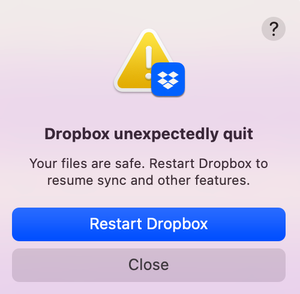
Outage Oct 30 2022?
Seem to be getting an error message repeatedly telling me dropbox has to restart. Anyone else?
 4 years ago
Exciting News!!!
Installed an older version of Dropbox (went back to August 2022), no restart, no pausing of the antivirus.
Launched the desktop app and presto, it started syncing!
Result: Everything is as it should be!!
Re-installed v160.4.4703 and everything seems to be working fine. Thanks for your help! 😁
lynmac
4 years agoCollaborator | Level 8
Walter, an update .. Dropbox re-install (same version) and restart completed and no change - error message is still present.
lynmac
4 years agoCollaborator | Level 8
Update #2 - After Help from DB Support
This is becoming intriguing and I'm learning so much thanks to Walter and Dropbox Support.
DB Support suggested that some "symlinks" were the root cause. In fairly technical language, something along the lines of "Symbolic links, Junction Points, or "symlinks", occur when folders are added to Dropbox that reference directories outside of the Dropbox folder or inside of the Dropbox folder but in a different folder. Because these symlinks may reference locations where Dropbox may have limited accessibility, they can cause various issues."
As suggested by DBS I ran a terminal search for the symlinks, deleted the 2 files that were identified, emptied the trash, hard reboot of my Mac, started Dropbox and presto.... same error. The irony is that the 2 files that were deleted had been in DB since November 2021, with no issue until yesterday 🤔
If it weren't for the fact I use DB so extensively, I would be entertained. 😎
Fingers and eyes crossed that there's more that can be tried to debug Dropbox!
About View, download, and export

Need support with viewing, downloading, and exporting files and folders from your Dropbox account? Find help from the Dropbox Community.
The Dropbox Community team is active from Monday to Friday. We try to respond to you as soon as we can, usually within 2 hours.
If you need more help you can view your support options (expected response time for an email or ticket is 24 hours), or contact us on X, Facebook or Instagram.
For more info on available support options for your Dropbox plan, see this article.
If you found the answer to your question in this Community thread, please 'like' the post to say thanks and to let us know it was useful!


