Your workflow is unique 👨💻 - tell us how you use Dropbox here.
Forum Discussion

ChristopherBell
1 year agoExplorer | Level 3
Right click menu in File Explorer is missing option to open file in browser
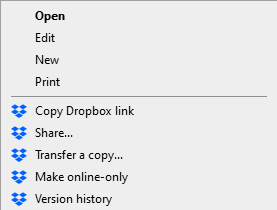
There used to be an option to open a file in Dropbox in your browser, but for some reason it's disappeared:
I can copy the Dropbox link and paste it into my browser to view it that way, but ...
- 1 year ago
Hope it’s OK if I chime in, @ChristopherBell! I may have missed it, but did you reinstall the Dropbox app on your computer and the option is still not showing?
Out of curiosity, do you have any other computers with the desktop app installed? Is the option missing from them, too?

ChristopherBell
1 year agoExplorer | Level 3
Hi Nancy,
Thanks for your input. I had run the installer to update the app, but hadn't done a complete uninstall and reinstall.
Uninstalling, restarting my PC and reinstalling has fixed the issue. The option now shows for me.
It's a bit of a pain since everything's needs to re-index but the option's back so it is what it is I guess.

Hannah Dropbox Community Moderator
1 year agoDropbox Community ModeratorThanks, @ChristopherBell, for keeping us updated.
Your feedback is also taken into consideration and your comments have been passed along to our team.
If you need anything else, let us know!
About View, Download, and Export

Get support with viewing, downloading, and exporting files and folders from your Dropbox account.
The Dropbox Community team is active from Monday to Friday. We try to respond to you as soon as we can, usually within 2 hours.
If you need more help you can view your support options (expected response time for an email or ticket is 24 hours), or contact us on X, Facebook or Instagram.
For more info on available support options for your Dropbox plan, see this article.
If you found the answer to your question in this Community thread, please 'like' the post to say thanks and to let us know it was useful!


