Our Community is in read-only mode until April 8th, learn more here. You can still search existing threads or get help via Dropbox Support, the Dropbox Help Center, or Learn.
Forum Discussion

carhogg
2 years agoHelpful | Level 5
The download button on the website doesn't work
Hi,
When I click this button to download files, nothing happens. How can I confidently make a backup on my hard drive of all files I have on dropbox?
Thanks,
Charlie
 2 years ago
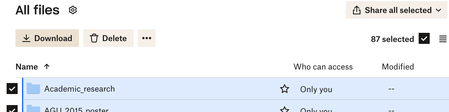
This fixed the problem. I think the limit of 10,000 files or 20 GB was limiting it. It is not good that no message of explanation came up. More importantly, downloading everything to a hard drive should be a simple single click.
I was planning to drop dropbox, and I think this lack of functionality that seems obvious to me is making that more likely. I don't feel confident that I can get all my files out reliably.

rbaltman
1 year agoExplorer | Level 4
Thanks for your response. Any file I try to download doesn't work--these are all my files that I uploaded. It is not a shared link, it is a file that I put there and when I try to download, there is absolutely nothing happening in Safari (my preferred browser). I tried it on chrome and that worked (so I got my file), but I don't like to use Chrome. Don't you think it should work in Safari? Something changed (maybe Apple, but they are a kind of dominant browser so Dropbox should be compatible?). Or maybe I pressed a wrong button--I need help figuring out what button I pressed.
When I got to the dropbox toolbar app and drag the file to my desktop it works (but it takes it off Dropbox, so I need to make a copy and drag, which is a pain). But when I choose the little world sphere glyph and it goes to the dropbox website, that's when DOWNLOAD doesn't work.
I attach a screenshot which shows what I am seeing and if want the file at the bottom wow-021... and choose "Download" from the "..." menu, it doesn't work.
Thanks,
Russ

Jay Dropbox Community Moderator
1 year agoDropbox Community ModeratorHI rbaltman, could you try using Safari in private browsing mode, without any extensions running, to see if that could be causing the download issue?
- rbaltman1 year agoExplorer | Level 4
I need to get home to try it, but I will when I get home tonight--it's my desktop that is acting up. On Safari at work, it works fine. But the home one is the problem, I think.
About View, Download, and Export

Get support with viewing, downloading, and exporting files and folders from your Dropbox account.
The Dropbox Community team is active from Monday to Friday. We try to respond to you as soon as we can, usually within 2 hours.
If you need more help you can view your support options (expected response time for an email or ticket is 24 hours), or contact us on X, Facebook or Instagram.
For more info on available support options for your Dropbox plan, see this article.
If you found the answer to your question in this Community thread, please 'like' the post to say thanks and to let us know it was useful!


