We’re Still Here to Help (Even Over the Holidays!) - find out more here.
Forum Discussion

Kristine
7 months agoNew member | Level 2
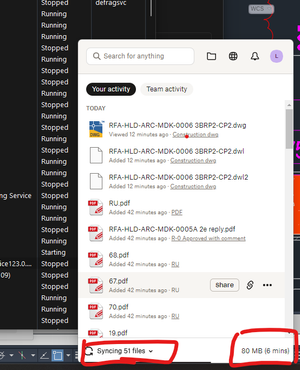
The Dropbox desktop app is stuck at syncing a specific number of files on Windows
Hi My Dropbox start from yesterday always syncing , not become "your file is up to date". Cannot sync all the files on today I saved. I tried as per 10 ways of stuck of syncing. But still is syncing ...

Walter Dropbox Community Moderator
7 months agoDropbox Community ModeratorHi Kristine - I'm sorry to hear you're experiencing a syncing issue.
To start, could you please let me know your computer's operating system version and what troubleshooting steps you've already tried?
Have you checked for any specific sync errors by clicking on your profile icon within the Dropbox app and selecting the "View sync issues" option?
If the problem continues after restarting your computer, could you please try quitting and then re-launching the Dropbox desktop application and see if that resolves the issue?
Please let us know the outcome.
About View, download, and export

Need support with viewing, downloading, and exporting files and folders from your Dropbox account? Find help from the Dropbox Community.
The Dropbox Community team is active from Monday to Friday. We try to respond to you as soon as we can, usually within 2 hours.
If you need more help you can view your support options (expected response time for an email or ticket is 24 hours), or contact us on X, Facebook or Instagram.
For more info on available support options for your Dropbox plan, see this article.
If you found the answer to your question in this Community thread, please 'like' the post to say thanks and to let us know it was useful!


