We’re Still Here to Help (Even Over the Holidays!) - find out more here.
Forum Discussion

cmcintoshphoto
3 years agoExplorer | Level 4
Thumbnails not showing for large portion of photos
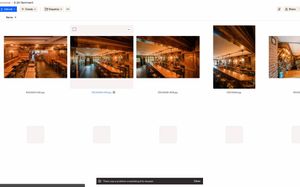
I'm having an issue with the web browser - like half of the images uploaded are not clickable, and appear as blank squares. I can confirm they are uploaded via the phone app, and the desktop client. ...

cmcintoshphoto
3 years agoExplorer | Level 4
Hi! So I opened the link in Safari and it showed perfectly fine when logged out. When I logged into my account on the browser it shows the same exact error, half of them non-clickable blank squares. And when I switch to the list view (on both browsers), it doesn't show the 'error' files at all. I can access all the photos that are supposed to be there perfectly on the phone app, though.
Also, on the browser window, the bar that shows "Suggested from your activity) it shows some of the photos that are the ones not showing up in the grid. I can click on them from there. But in the grid, they don't exist.

Nancy Dropbox Community Moderator
3 years agoDropbox Community ModeratorHmm, that’s interesting.
When saying that you can access all files while logged out, do you mean that you’re accessing them via a shared link?
Are you the owner of this shared link, or was it sent to you by another user? Are you the only one encountering this behavior?
Also, can you take one extra step and test this via an incognito window on your web browser?
About View, download, and export

Need support with viewing, downloading, and exporting files and folders from your Dropbox account? Find help from the Dropbox Community.
The Dropbox Community team is active from Monday to Friday. We try to respond to you as soon as we can, usually within 2 hours.
If you need more help you can view your support options (expected response time for an email or ticket is 24 hours), or contact us on X, Facebook or Instagram.
For more info on available support options for your Dropbox plan, see this article.
If you found the answer to your question in this Community thread, please 'like' the post to say thanks and to let us know it was useful!


