Your workflow is unique 👨💻 - tell us how you use Dropbox here.
Forum Discussion

NZ Adam
1 year agoNew member | Level 1
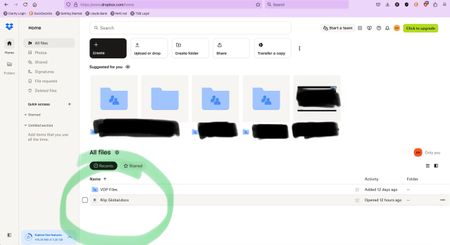
A suspicious file was shared with me, but I can't delete it from my account.
Hi all,
I received a very legit-looking email from a colleague (it was from her exact email address, signed off how she would do etc) which had a PDF attached for me to view.
When I clicked on th...
- 1 year ago
Hey NZ Adam, just wanted to clarify something.
This file appears in your "recents" because you opened it recently.
Since it was just a shared file you opened through a link, it wouldn't be saved in your Dropbox, that's why you can't delete it.
Can you search your account's contents, to confirm this?
If it's not saved, it should just disappear after a while of not accessing it.
I hope this helps!


Nancy Dropbox Community Moderator
1 year agoDropbox Community ModeratorHi NZ Adam, thanks for your post.
To clarify, did you also check with your colleague and she never sent that email on her end indeed?
As for the actual file on your Dropbox account, can you select it (by clicking on the square button next on its left side) and send me a screenshot of what you see then?
Ping me when you’re ready.
About Delete, Edit, and Organize
Solve issues with deleting, editing, and organizing files and folders in your Dropbox account.
The Dropbox Community team is active from Monday to Friday. We try to respond to you as soon as we can, usually within 2 hours.
If you need more help you can view your support options (expected response time for an email or ticket is 24 hours), or contact us on X, Facebook or Instagram.
For more info on available support options for your Dropbox plan, see this article.
If you found the answer to your question in this Community thread, please 'like' the post to say thanks and to let us know it was useful!


