Your workflow is unique 👨💻 - tell us how you use Dropbox here.
Forum Discussion

anonymous
2 years agoAdding text box to PDF files
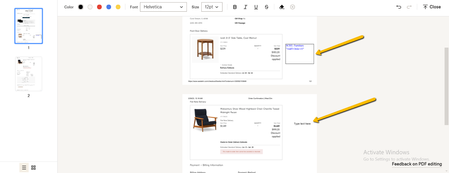
Hi, first time user here. I have spent hours trying to figure this out. I'm trying to add a text box and I go to Edit PDF but can only write text, not enclose it in a box. I am trying to find out how...
- 2 years ago
Because thats how the comments system works I'm afraid. The comments are not a part of the file itself but rather a 'conversation' type screen at the side of it. You have selected an area you wish to comment on, you then say what the comment is and it lists at that side. People can then move around the file and see those comments at the side at the points people have drawn around.
Also note that unless people are full members (i.e. have a logged in Dropbox account), with sharing rights, they wont be able to see this.

Mark Super User II
2 years agoSuper User IIBecause thats how the comments system works I'm afraid. The comments are not a part of the file itself but rather a 'conversation' type screen at the side of it. You have selected an area you wish to comment on, you then say what the comment is and it lists at that side. People can then move around the file and see those comments at the side at the points people have drawn around.
Also note that unless people are full members (i.e. have a logged in Dropbox account), with sharing rights, they wont be able to see this.
anonymous
2 years agoThank you. Apparently someone at my company is doing this box with text, but they must be using a pdf editor like Adobe?
About Delete, Edit, and Organize
Solve issues with deleting, editing, and organizing files and folders in your Dropbox account.
The Dropbox Community team is active from Monday to Friday. We try to respond to you as soon as we can, usually within 2 hours.
If you need more help you can view your support options (expected response time for an email or ticket is 24 hours), or contact us on X, Facebook or Instagram.
For more info on available support options for your Dropbox plan, see this article.
If you found the answer to your question in this Community thread, please 'like' the post to say thanks and to let us know it was useful!


