We’re Still Here to Help (Even Over the Holidays!) - find out more here.
Forum Discussion

soonerdm
2 years agoExplorer | Level 3
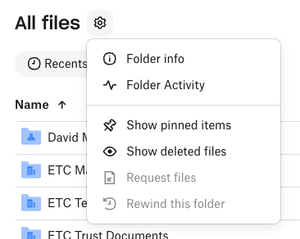
As an admin I can't use Dropbox Rewind in 'All Files'
We are just running tests to understand how to recover data if something were to infect our files. I would like to use Rewind as an admin but it is not an option for me
What needs to happen fo...

soonerdm
2 years agoExplorer | Level 3
I am the only admin.
I have to click the ... then Folder Activity and then rewind.
As admin I do not have access to certain folders. I was hoping I would not have to add me to every folder to ensure Rewind would work in case we ever needed it.
What is my best course of action?
- Walter2 years ago
Dropbox Community Moderator
Hey soonerdm - thanks for clarifying that for us.
May I ask if you're getting the same results on other browsers as well?
If you do, does this occur for folders you own or for ones that are owned by others only?

About Delete, edit, and organize
Solve issues with deleting, editing, and organizing files and folders in your Dropbox account with support from the Dropbox Community.
The Dropbox Community team is active from Monday to Friday. We try to respond to you as soon as we can, usually within 2 hours.
If you need more help you can view your support options (expected response time for an email or ticket is 24 hours), or contact us on X, Facebook or Instagram.
For more info on available support options for your Dropbox plan, see this article.
If you found the answer to your question in this Community thread, please 'like' the post to say thanks and to let us know it was useful!


