Your workflow is unique 👨💻 - tell us how you use Dropbox here.
Forum Discussion

user71
7 months agoExplorer | Level 3
Automation won't apply to existing files. How can I achieve that?
I have a directory with a very large number of files (several thousand) that I only access online. All of the files have names based on their date of creation (eg 2025-07-01-7:00.txt). I would like t...

user71
6 months agoExplorer | Level 3
It turns out that the problem with attaching the screenshot files was that they were too large. I have reduced their size and attach them here.

Jay Dropbox Community Moderator
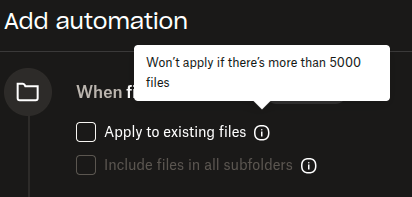
6 months agoDropbox Community ModeratorAs you mentioned you have several thousand files, are there over 5000 files in the folder you're trying to automate?
If you click the i icon there next to 'Apply to existing files', it would mention the file limit.
About Delete, Edit, and Organize
Solve issues with deleting, editing, and organizing files and folders in your Dropbox account.
The Dropbox Community team is active from Monday to Friday. We try to respond to you as soon as we can, usually within 2 hours.
If you need more help you can view your support options (expected response time for an email or ticket is 24 hours), or contact us on X, Facebook or Instagram.
For more info on available support options for your Dropbox plan, see this article.
If you found the answer to your question in this Community thread, please 'like' the post to say thanks and to let us know it was useful!


