We're making some changes to the Dropbox Community 👩💻 - Find out more here.
Forum Discussion

moyay
2 years agoExplorer | Level 4
Chinese characters in my deletion confirmation pop-up on Windows
Hi,
Something new happen recently when I was deleting some files. When I delete something from my Dropbox, I get a notice that they're moving the files to the Recycle Bin and then another pr...
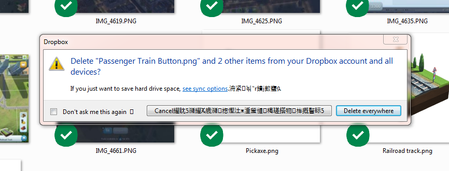
- 2 years ago
Hi there Edward Alan and GrandpaW,
We've released an expected fix in our Beta Build 192.3.4492.
PS: auto-updates for this are available to everyone who chose "Include me on early releases" on the Settings page.
Let us know if you have rolled out this version and still see these characters
Thanks,
Sam


Megan Dropbox Community Moderator
2 years agoDropbox Community ModeratorHey GerardoPetrosino, is this a regular thing, or does this happen out of the blue?
If you also had a screenshot, I'd more than appreciate it. Thanks!

margTD
2 years agoNew member | Level 2
I've had the same issue since yesterday and am also using Windows 7 Professional.
 GerardoPetrosino2 years agoExplorer | Level 3
The same as replied by margTD, I also confirm that the symbols/asian characters in the notification box change every time, even for the same file (i.e. if I don't remove the file pressing "cancel" and I delete the same file again)
 Liviuk2 years agoExplorer | Level 3
Me too (I noticed that in Windows 7), also symbols are changing or changing position. Maybe it matters, recently I installed Dropbox Passwords on Android Phone and I use Dropbox Passwords in Opera Browser. On Windows 11 the first question from #moyay with moving file to Recycle Bin does not appear, only the second question that is all right, without assian characters.
 caraparker2 years agoNew member | Level 2
Same issue, same OS (Windows 7 Pro). Just noticed it happening for the first time this morning!
About Delete, Edit, and Organize
Solve issues with deleting, editing, and organizing files and folders in your Dropbox account.
The Dropbox Community team is active from Monday to Friday. We try to respond to you as soon as we can, usually within 2 hours.
If you need more help you can view your support options (expected response time for an email or ticket is 24 hours), or contact us on X, Facebook or Instagram.
For more info on available support options for your Dropbox plan, see this article.
If you found the answer to your question in this Community thread, please 'like' the post to say thanks and to let us know it was useful!


