Our Community is in read-only mode until April 8th, learn more here. You can still search existing threads or get help via Dropbox Support, the Dropbox Help Center, or Learn.
Forum Discussion

moyay
2 years agoExplorer | Level 4
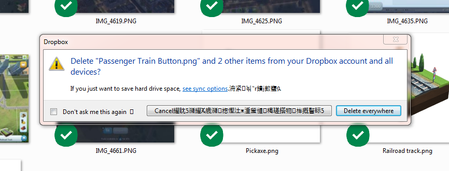
Chinese characters in my deletion confirmation pop-up on Windows
Hi,
Something new happen recently when I was deleting some files. When I delete something from my Dropbox, I get a notice that they're moving the files to the Recycle Bin and then another pr...
- 2 years ago
Hi there Edward Alan and GrandpaW,
We've released an expected fix in our Beta Build 192.3.4492.
PS: auto-updates for this are available to everyone who chose "Include me on early releases" on the Settings page.
Let us know if you have rolled out this version and still see these characters
Thanks,
Sam


Mark Super User II
2 years agoSuper User IIJust tried to escalate for you all 🙂
It would help if people could just confirm Dropbox version number as well as OS version.
For info a newer version of Dropbox is available here. That may fix it.

margTD
2 years agoNew member | Level 2
Hi Mark - I'm on 190.4.6383
- Sam DBX2 years ago
Community Manager
Hi everyone,
Thanks for flagging this.
Confirming here that these are ''garbaged'' characters appearing in the local delete dialogue.
Our team is aware and working on it (and they should not be harmful).
We'll keep you updated once we've cleared them.
Thanks!
Sam
 Nigelbc2 years agoExplorer | Level 3
Happening with me too - W7 Home premium DB 190.4.6383
 AM7772 years agoNew member | Level 2
Hi there, today I have discovered the same by deleting something from the Dropbox!!! Strange, as far as I can see is this problem already more than 2 weeks old an still not solved!!!
- Sam DBX2 years ago
Hi there AM777,
We expect a fix to be rolled out in our next stable version (192).
I'll make sure to share more news here.
Thanks for bearing with us,
Sam
 Edward Alan2 years agoHelpful | Level 5
It's still there, on Jan 29, 2024
About Delete, Edit, and Organize
Solve issues with deleting, editing, and organizing files and folders in your Dropbox account.
The Dropbox Community team is active from Monday to Friday. We try to respond to you as soon as we can, usually within 2 hours.
If you need more help you can view your support options (expected response time for an email or ticket is 24 hours), or contact us on X, Facebook or Instagram.
For more info on available support options for your Dropbox plan, see this article.
If you found the answer to your question in this Community thread, please 'like' the post to say thanks and to let us know it was useful!


