Your workflow is unique 👨💻 - tell us how you use Dropbox here.
Forum Discussion

bstahl
8 years agoNew member | Level 2
Deleted folders keep reappearing. What can I do?
I had this problem and putting a file in the folder did not resolve it, it immediately re-created the folder after I deleted it from the Finder (Mac 10.13.3). What did work was to choose Pause Syncin...
 7 years ago
Many thanks to the Dropbox team - especially Walter for helping me resolve this issue. In my case one fo the 9 sharers of a top level folder was adding back a multi layered sub folder, containing no files, each time the administrator attempted to delete it. All sharers told me that they had attempted to delete the reappearing folder........drilling down by the DB team revealed the culprit who hadnt actually made an attempt to delete but merely said he had! Deletion done and all fixed.....woohoo, champagne celebration! but....
How do you fault find without using the DB team in this case? Two options: make use of Event History and Version History. Using event history showed where I had attempted to delete the folder but did not show who added it back. Version history would not have worked as it only applies to actual files and not folders (this folder structure contained no files). I would suggest adding in a file, delete the folder structure, if it all reappears then check the version history of the individual file - it should show you deleting it and then should reveal who is adding it back. Note the use of "should"! What seems clear is that there are numerous ways that this "reappearing ghost" problem can be solved. Perhaps DB could set up a really detailed help page, that can be easily found, that covers all the myriad permutations of this challenging problem.
Once again - big thank you to the DB team for their prompt and detailed assistance. GuyM

sncooper
6 years agoHelpful | Level 5
Thanks Jane, I looked at the Version History.
I saw that the file was created by me.
I saw that I deleted the file.
I saw that "Corporate Laptop" 'added' the file back.
I read your comments about some other process maybe locking the file preventing it from being deleted - how do I track this down? Because I had no applications open.
I tried deleting the files whilst the "Corporate laptop" was turned off, but they came right back when I booted it back up and logged in.
I have no idea what else to try - what could be locking these?
By the way, my Dropbox is on my C: drive, not a network share.
sncooper
6 years agoHelpful | Level 5
Here is a screenshot of my version history for a dummy file I created to test:

- sncooper6 years agoHelpful | Level 5
I have a new problem:
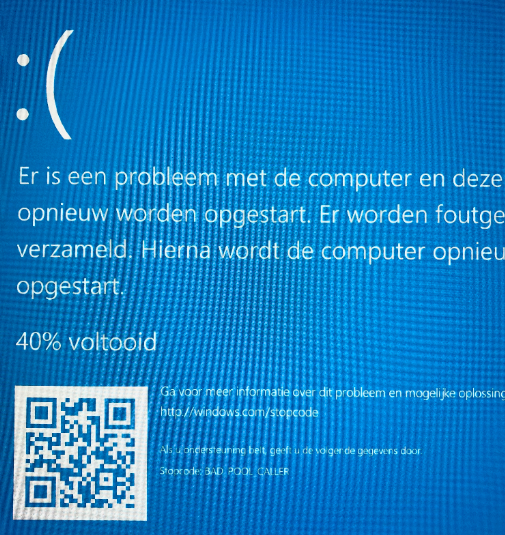
I edited an existing word document on my home computer (in the shared dropbox folder) and as soon as I clicked save my corporate laptop got a 'blue screen of death' and it happens every time I login again.
We had to put the computer into airplane mode and uninstall dropbox !!!
We uninstalled and reinstalled, and deleted the dropbox folder but it keeps happening.
Not good.
Any suggestions?
- sncooper6 years agoHelpful | Level 5
It says BAD_POOL_CALLER
About Delete, Edit, and Organize
Solve issues with deleting, editing, and organizing files and folders in your Dropbox account.
The Dropbox Community team is active from Monday to Friday. We try to respond to you as soon as we can, usually within 2 hours.
If you need more help you can view your support options (expected response time for an email or ticket is 24 hours), or contact us on X, Facebook or Instagram.
For more info on available support options for your Dropbox plan, see this article.
If you found the answer to your question in this Community thread, please 'like' the post to say thanks and to let us know it was useful!


