Our Community is in read-only mode until April 8th, learn more here. You can still search existing threads or get help via Dropbox Support, the Dropbox Help Center, or Learn.
Forum Discussion

JMwambala
3 years agoHelpful | Level 6
Dropbox File/folder and Syncing Icons Size
Hi there
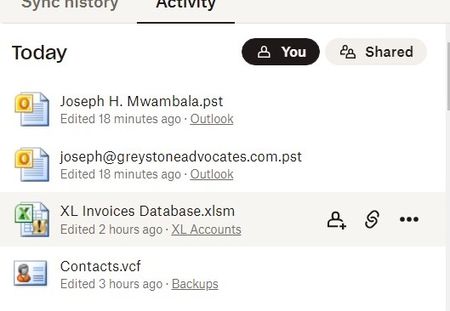
Am running Windows 11 Pro; When I click the Dropbox Icon in my toolbar I get File/folder and Syncing Icons that are too huge that I cannot see my Account Icon or get to preferences and...
 3 years ago
Hi Walter
Thank you for your swift response.
The screenshot I sent is exactly what I was seeing. There was no Avatar or syncing icons.
However, I re-installed Dropbox and that solved the problem!
Thank you very much

Walter Dropbox Community Moderator
3 years agoDropbox Community ModeratorHey JMwambala, sorry to hear you're having issues with this.
You should be able to access the desktop app's preferences from your avatar on the upper right corner of the window shown in your screenshot. Are you not seeing it at all or you just can't click on it at all?
Could you maybe send us a full-page screenshot to have a better visual?
Also, I'm not seeing any syncing icons in your screenshot - only file type icons. Are you referring to those or did you have something else in mind?
Keep me posted!
JMwambala
3 years agoHelpful | Level 6
Hi Walter
Thank you for your swift response.
The screenshot I sent is exactly what I was seeing. There was no Avatar or syncing icons.
However, I re-installed Dropbox and that solved the problem!
Thank you very much
About Delete, Edit, and Organize
Solve issues with deleting, editing, and organizing files and folders in your Dropbox account.
The Dropbox Community team is active from Monday to Friday. We try to respond to you as soon as we can, usually within 2 hours.
If you need more help you can view your support options (expected response time for an email or ticket is 24 hours), or contact us on X, Facebook or Instagram.
For more info on available support options for your Dropbox plan, see this article.
If you found the answer to your question in this Community thread, please 'like' the post to say thanks and to let us know it was useful!


