Your workflow is unique 👨💻 - tell us how you use Dropbox here.
Forum Discussion

Triflux
7 months agoHelpful | Level 6
Excel file accidentally deleted and now I can’t recover it
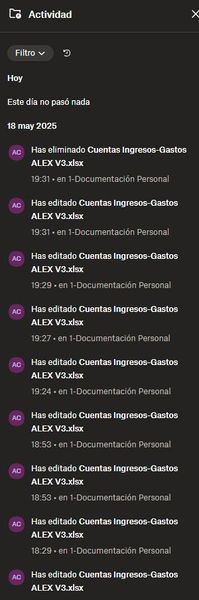
Good afternoon, On May 18th, I was editing an Excel file and, for reasons I don’t quite understand, the folder’s activity log shows that the file was deleted at the exact same time it was last edite...
 7 months ago
Hi Hannah!
Santiago, a person from the Dropbox team, ib tje spanish community reached to le also. He scalated the issue to the recovery team and they have been able to restore the file!!!
I have recovered it and all the data and the problem is solved!!
Regards!
Triflux
7 months agoHelpful | Level 6
They do have backups - those backups last 30 days after which they arent recoverable. Even a day or so over is not recoverable. Think of it from the legal side for a moment, they tell everybody the files are removed and if they then didnt thats a huge breach of trust etc.
Hi Mark! thanks for your reply. Yes, from that point of view, it´s correct they delete it just in time qhen the 30 days expires. It has it legal side as you said.
Its always possible to try, however realistically if you've been using your hard drive since you deleted it chances are it wouldnt be recoverable now.
Best thing to do is have a google search for options
I´ve been trying but with not much success. It is a mess because I didn´t know how the file ended up deleted, but it is what it is...
Any connected devices that havent sync'd the deleted item?
In your recycle / trash can on your local device?
I had an old smartphone I changed a month and a half ago. I´va started it with no internet connection and the file was there. But as it is the smartphone app, I couldn´t copy the file or transfer it or browse into the internal files of the app to search for it. I´ve tried copying it with other name or changing the name, but just in the moment i´ve given it access to internet to complete the action, the file disappeared :(
I will try other things but it is a great dissaster to lose that file (A lesson for the future, more backups copies...)

Mark Super User II
7 months agoSuper User IITriflux wrote:But as it is the smartphone app, I couldn´t copy the file or transfer it or browse into the internal files of the app to search for it
Dropbox mobile apps actually only show the list of file names and dont actually store anything on the device (unless you mark as a favourite file) so sadly that would be expected :(
About Delete, Edit, and Organize
Solve issues with deleting, editing, and organizing files and folders in your Dropbox account.
The Dropbox Community team is active from Monday to Friday. We try to respond to you as soon as we can, usually within 2 hours.
If you need more help you can view your support options (expected response time for an email or ticket is 24 hours), or contact us on X, Facebook or Instagram.
For more info on available support options for your Dropbox plan, see this article.
If you found the answer to your question in this Community thread, please 'like' the post to say thanks and to let us know it was useful!


