Your workflow is unique 👨💻 - tell us how you use Dropbox here.
Forum Discussion

Chezzie
5 months agoExplorer | Level 4
How can I find what files I've stored on my Dropbox account to delete them and free up space?
Question or Issue
Hi
I have a similar issue to Thingy. I have tried to troubleshoot following all suggestions provided in this suggestion string but cannot even identify what, if anything, I...
- 5 months ago
Thanks for posting on our Community today, Chezzie! Welcome aboard.
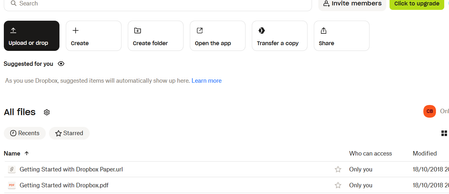
If you have any files/folders stored on your Dropbox account, they should be visible at your Homepage here (which looks like the page you’re currently at).
Other than that, you can also check your Backups page here, in case you’ve enabled computer/external drive backup and you wish to delete some files from there, as well.
Let me know, if you need any further help.


Chezzie
5 months agoExplorer | Level 4
Nancy, thanks so much. That's where the files were. A backup of a 500GB Hard Drive. Thank you, I will stop tearing my hair out now!
Kind regards
Chezzie


About Delete, Edit, and Organize
Solve issues with deleting, editing, and organizing files and folders in your Dropbox account.
The Dropbox Community team is active from Monday to Friday. We try to respond to you as soon as we can, usually within 2 hours.
If you need more help you can view your support options (expected response time for an email or ticket is 24 hours), or contact us on X, Facebook or Instagram.
For more info on available support options for your Dropbox plan, see this article.
If you found the answer to your question in this Community thread, please 'like' the post to say thanks and to let us know it was useful!


