Our Community is in read-only mode until April 8th, learn more here. You can still search existing threads or get help via Dropbox Support, the Dropbox Help Center, or Learn.
Storage space
82 Topics
Trying to delete files, not working. I refuse to just buy more storage space.
I am trying to make space in my dropbox on my HP computer, since I am getting a warning about starting to delete files unless I buy more storage space. I absolutely do not want to buy more space! It is a good time to delete some unnecessary files. So now I am permanently deleting all my deleted files, one by one. At some point it does not allow me to delete any more of them. I get no message to explain why, it just does not function. I am pretty sure it just tries to force me to buy more space. Any thoughts on this? Or, do you guys know of any other cloud services that actually allow you to manage your own data?188Views0likes14Comments
I deleted some files, but they still appear on my Dropbox account online.
Operating System/Browser (if using the web) (Windows 11) Dropbox App Version (if using the app) 244.4.6580 Question or Issue Using basic plan and got he prompt to remove files. I deleted the folder that was share to public and the files are still there. There is no back up. Under shared those files are not listed there. Under shared links , visited links, the link to main online page is there.64Views0likes5Comments
Half of my photos are missing from the mobile app, but it still says I'm over-quota.
Device iPhone 17 Dropbox App Version (if using the app) Latest update Question or Issue I click into my Dropbox app one day and I noticed half my photos were missing don’t no why but it still says my account is full.40Views0likes1CommentMy Dropbox account is out of space. Should I permanently delete some shared folders?
Good day My client shared some of his folders with me, but now I can't access anymore (new year's folders) due to my Dropbox out of storage. I have deleted some of the folders from my Dropbox but still can't access the new folders. It is a problem - I am only viewing the folders - doesn't upload anything. Is there a way to permanently delete the old folders in/on my Dropbox without deleting it on his side?101Views0likes4Comments
Files won't delete, repeatedly removing access won't free up space
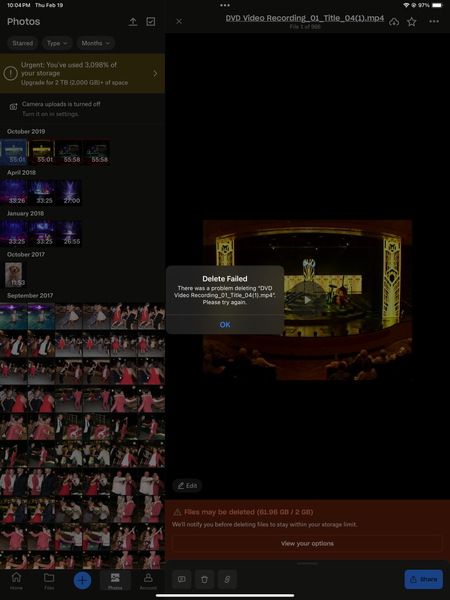
Device - iphone 16 and MacBook Pro Operating System/Browser (if using the web) - Sequoia 15.7.3/Chrome Question or Issue I've had the "You're out of storage" message for about a year but most of my dropbox usage is temporary file viewing (via "viewed links") that is sent to me from other people for quick download to my device then I never see it again. I've had a handful of folders that were "shared" to me over the years with large amounts of pictures and videos but the most recent folder was back in 2019. I've been deleting these same folders and individual files over and over and over tonight and it won't stick. The pop-ups saying they're removed come up, and sometimes, the file would disappear to then reappear again soon after, but most of the time, a pop up would say "xyz folder has been removed from your dropbox" but then I'd be staring right at it, not removed. When I go to "Photos" one random folder of 915 photos is there and (10) 11min-55min long videos that are all from completely different "removed" folders are there and I get an error message that says "there was a problem deleting xyz. please try again." no matter which device I try to delete them on. I've now "removed" literally every folder from my dropbox from every device I have and nothing has changed. It says I have "61.96GB of 2GB used". Please help me solve this!!Solved144Views0likes4Comments
My account is full and the desktop app is stuck syncing, so I can't delete any more files
I decided to send a large number of photos and videos to Dropbox to back them up. Doing so caused me to exceed the 2 GB limit on my basic plan. Since then, I have been trying to delete enough photos and videos to stay under the 2 GB so as not to have to pay a subscription price for an advanced plan. However, when I hover on the Dropbox icon on the top menu bar of my MacMini M4 computer, it says "Dropbox 241.4.4795" and next line "Uploading 1,343 files..." It has been stuck on that number for weeks now and I have tried to use ChatGPT to get it syncing again but to no avail. I have tried the following: Pause and Resume, View Sync Issues (it says that I don't have any sync issues), I have given Dropbox Full Disk Access, re-indexing safely by quitting Dropbox - restarting the Mac and opening Dropbox, and made sure that Photos and Preview were off. ChatGPT then suggests renaming the local Dropbox folder then opening Dropbox in which case it will create a fresh folder and reconcile deletes from the cloud correctly. I didn't do this last step since I decided to contact you. If I can't get this fixed, I'm in a forever do-loop of exceeding the basic limit and constantly receiving notices that I am above the limit. Any help that you can give me would be greatly appreciated.Solved176Views0likes3CommentsI can't find any files on my Dropbox account in order to free up space
Do you have access to the email linked to the account? (Yes) Are there any devices connected to your Dropbox account? (work laptop) Question or Issue The email that Dropbox sent me contained a warning said that I need to either remove members of shared folders, OR delete files OR upgrade my plan. However, when I logged in today, I was not able to see ANY files or folders. That makes it impossible to know which folders have "shared members", and impossible to delete files. So please allow me to see my folders and files, so that I can delete some files or remove members of shared folders. I may decide to upgrade my plan, but I can't make that decision until I can see my files and folders. Also, I don't know when you reduced my plan to have a limit of 5Gb. Can you please check on that, and check whether this is a database or programming error on your part? Thank you.Solved218Views0likes5Comments
I can't delete my old backups
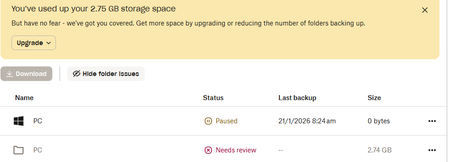
Need help: I looked at a few threads concerning deleting Old Backups but none have solved my issue. See attached screenshot. Somehow I've managed to set up a new backup for my PC which I've paused for now. I have tried countless ways to delete the backups that have filled my Dropbox...no joy. I've gone through the Backup Settings, and I cannot find the old backup to delete: Can anyone see what I need to do for this? Mike152Views0likes7Comments