Our Community is in read-only mode until April 8th, learn more here. You can still search existing threads or get help via Dropbox Support, the Dropbox Help Center, or Learn.
Forum Discussion

Thingy
5 months agoNew member | Level 2
How can I move files out of my account and close it or keep my usage under 2 GB?
Question or Issue
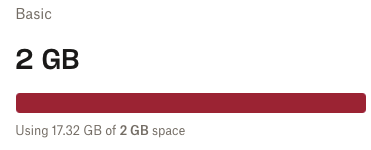
I have been on the Basic package for many years. I do not want to close my account. I overfilled my account long before the current charging regime came in. I cann...

Thingy
5 months agoNew member | Level 2
Hi Jay
Thanks for your reply. Your link works, but I get the message that implies I have to upgrade before I can move the files. I feel I am being blackmailed! :-)
To get more space I have to purchase an upgrade. I know there is a free period, but that means I need to get everything moved before they start charging me. I cannot guarantee I can be that organised - so much going on here.
- Hannah5 months ago
Dropbox Community Moderator
Hi there, Thingy, thanks for your update on this.
From what I can see on from your screenshot, there's a little "X" button at the top right corner of this notification; if you click it, does the notification go away? And are you allowed to access/download/delete your files after that?
You definitely wouldn't be forced to upgrade your account, if you didn't want to.
Also, here are some free ways you can earn some bonus space on your Dropbox account.
I hope this helps, but if you're still having issues accessing your files, let me know!


About Delete, Edit, and Organize
Solve issues with deleting, editing, and organizing files and folders in your Dropbox account.
The Dropbox Community team is active from Monday to Friday. We try to respond to you as soon as we can, usually within 2 hours.
If you need more help you can view your support options (expected response time for an email or ticket is 24 hours), or contact us on X, Facebook or Instagram.
For more info on available support options for your Dropbox plan, see this article.
If you found the answer to your question in this Community thread, please 'like' the post to say thanks and to let us know it was useful!


