Our Community is in read-only mode until April 8th, learn more here. You can still search existing threads or get help via Dropbox Support, the Dropbox Help Center, or Learn.
Forum Discussion

Hap H.
11 years agoNew member | Level 1
How can I remove duplicate photos from my Dropbox photos?
I somehow uploaded several hundred photos from my iphone to dropbox. Not sure how I did it, but now I see a lot of duplicate photos in dropbox (carousel).
Hey everyone,
You can use Dropbox’s Find duplicates option on dropbox.com to quickly locate duplicate files (including photos) and delete them in bulk: https://help.dropbox.com/organize/find-duplicate-files.
If your photos are only “similar” rather than identical copies, you may need to sort and remove them manually.

55 Replies
Replies have been turned off for this discussion
- Dell_Dropbox3 months ago
Community Manager
Hey everyone,
You can use Dropbox’s Find duplicates option on dropbox.com to quickly locate duplicate files (including photos) and delete them in bulk: https://help.dropbox.com/organize/find-duplicate-files.
If your photos are only “similar” rather than identical copies, you may need to sort and remove them manually.
 Annie B.88 years agoHelpful | Level 5
I have been dealing with this for a long time. another issue is that I take a lot of pictures and then make edits (also on my other phones) mos tly for posting items I want to sell. But when I go to post the final edited image, all of them are there and I have no idea which is the one I decided to use. I also have the problem of having as many as 10 duplicates of the same picture, sometimesI want to keep randomly within the same folder, as well as in many other folders. I never get a message that there already one and which one do I want to keep. And they all have different image sizes and I need to look at them both to see which I want keep choose. want to move all my pictures off dropbox folders and Dropbox.com. I can't even just move them to a flash drive, I can only copy. So i create a new folder on laptop, move dropbox folders to that new forlder ad delete them on dropbox.There has got to be a better way! If I cancel my dropbox account, I will lose everything. So many are from places (other old external drives or otherwise unable to acess, etc) I do like that feature on Dropbox, because I have photos as old as 2003. but they'll be gone. I am not very experienced on windows or Android. I bought a new 256GB laptop and it has no more space it's all from Dropbox. It's very frustrating and confusing this way, Especially since there are so many duplicates in so many folders. I want to move them all to Google Photos. (which is a whole! separate thing I have'nt learned bout). I don't know if I move the entire folders from Dropbox folder and delete the now-empty folders from Dropbox in Windows on my laptop. will Dropbox create a new folder again or will it not upload if there is no longer that folder in dropbox folder. I have 50,000 pictures in so may places in so many different folders so manually deleting all the duplicates is not an option. I just don't know what to do. Bottom line I guess is I want to keep everything on dropbox.com as well as my laptop Dropbox folder. I've paused syncing on Dropbox untill I can deal with this issue first, Of course, I imagine I will have the same problems if I turn on sync dropbox again. And then closing my account while still havsing all the photos -minus all the duplicates- I now have on my phone and not uploaded anywhere yet. If anyone can make sense out of any of this post and help me out, Thank you. Again, I am sorry for the long, confusing post. Oh, and I can't move the new folder created for all my files copied from Dropbox in order get everthing on a flash drive and then delete my Dropbox folder because there is not enough space on my flash drive. I don't know which files will fit without finding out how big every file is and move that many to flash drive. As you can see, I HAVE ABSOLUTELY no idea what I'm doing and I don't have anyone who can help me. The last time I had a computer company tech come help me. I ended up with so many files not copied, and gone forever....
 Karvin8 years agoNew member | Level 2
I use DuplicateFilesDeleter. It works like a charm, always!
 GO9 years agoNew member | Level 2
I got iPhone and camera upload two folders with same pictures. The only difference is Camera upload has difference file names (data and time) whereas iPhone folders has the same name what I see in my Phone IMG...
Can't sort out this issue, thousands of images and videos in dulicate. If I stop camera upload then iPhone folders also becomes blank.
 Terry P.9 years agoCollaborator | Level 10I've been monitoring this thread as I have similar issues. But - like the original poster - I am using an iPhone and iPad. Not a Samsung device.
--
Terry, East Grinstead, UK Karl H.49 years agoCollaborator | Level 8I think someone has found the responsible app. There is a Samsung "feature" that creates "events" out of your photos and possibly videos... Without being turned on and without informing you that it's doing this. (Maybe the next thing they can "give" us without asking is something to take all of our emails and texts and photos on a given day, and combine them into little stories! Wouldn't that be swell!) Anyway, go to Gallery and find Events (in a little pull-down menu), and turn off Auto-Create Events. Thanks to rin for finding this!
- Terry P.9 years agoCollaborator | Level 10
Simon E.11 sums up my own feelings too.
As a result of this serious upload issue, plus the announced discontinuation of the Public folder, and above all the apparent indifference of Dropbox Support to user complaints, I'm going to investigate Google Drive and iCloud and save myself £99 per year.
Terry, UK
- Karl H.49 years agoCollaborator | Level 8
It's early December 2016 and this is still happening. I took 5 videos on 12/1 and 12/2. On 12/4 at 5:36pm, something caused copies of these 5 videos to be uploaded to Dropbox in reverse order. That's 317mb of extra data.
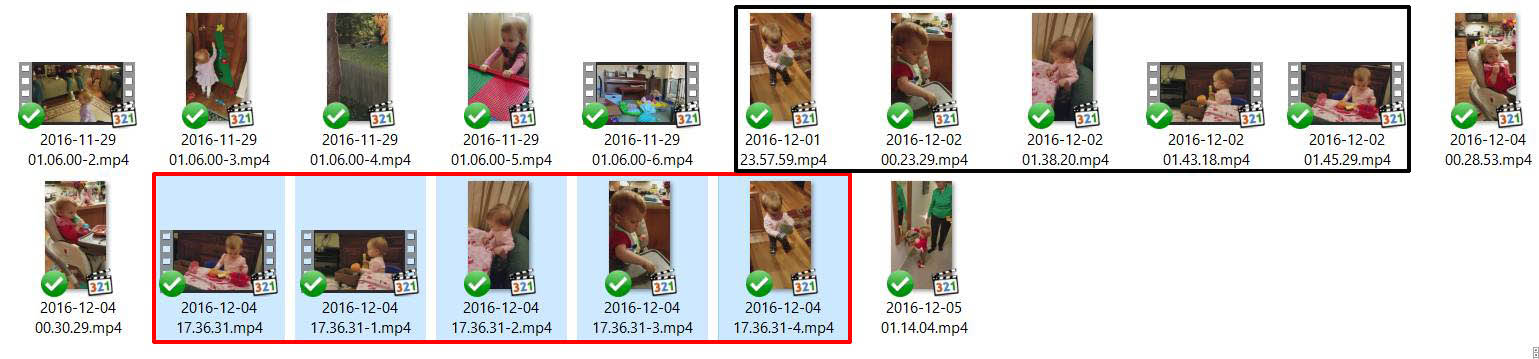
These are undetectable by duplicate file checking software, because they are changed in some small way -- the file size is slightly larger (by 76 bytes!):
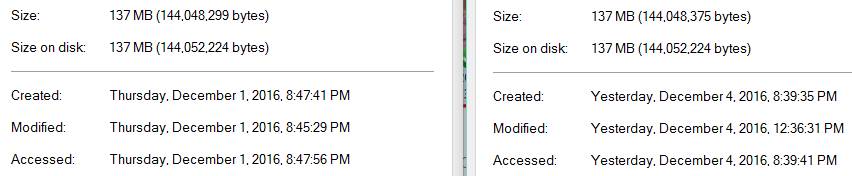
This started happening when I got a new Samsung S7 a few months ago. Something on the phone (that was not on my last phone) is changing these files, and finding what is doing it is the best way to fix this. I looked at my Google Photos and there is nothing there. I can't find any Samsung Cloud or Sync enabled on my phone. What other things might be responsible?
Dropbox is just doing what it's supposed to, so on one hand it's not to blame, but as long as it keeps happening they're going to have an increasing number of unhappy users, so it's in their interest to help find the culprit.
- Simon E.119 years agoNew member | Level 1
An update from Dropbox support - I got this mail this afternoon:
Thanks for reaching out about this! We apologize for the hassle and we appreciate your patience.
We're aware of this bug and working to fix it. When we have a fix in place, we'll release an update via the App Store, so make sure to stay up to date with the latest Dropbox releases.
Again, thanks for letting us know and thanks for using Dropbox!
- Simon E.119 years agoNew member | Level 1
I emailed with Dropbox support and this is the latest reply I've had:
If you are seeing (1) added to a file name, this means you added a file in a folder that already had the same type of file with the same file name. This usually happens with a copy.
If you see a file with -1 in the file name, this happens when a third party app changes your photo slightly. Dropbox sees this as a new photo and uploads it again. When it does, the file is renamed with a -1.jpg at the end. To stop this from happening, you will need to turn off camera uploads, uninstall any syncing or third party apps that could be editing your photos, and then turn camera uploads back on.
After this take a single photo. Is this photo duplicated? If not, you have uninstalled the application that is doing this.
I will try this later, but I don't think I have any other app syncing with Dropbox so I don't expect it to work.
About Delete, Edit, and Organize
Solve issues with deleting, editing, and organizing files and folders in your Dropbox account.
The Dropbox Community team is active from Monday to Friday. We try to respond to you as soon as we can, usually within 2 hours.
If you need more help you can view your support options (expected response time for an email or ticket is 24 hours), or contact us on X, Facebook or Instagram.
For more info on available support options for your Dropbox plan, see this article.
If you found the answer to your question in this Community thread, please 'like' the post to say thanks and to let us know it was useful!


