Our Community is in read-only mode until April 8th, learn more here. You can still search existing threads or get help via Dropbox Support, the Dropbox Help Center, or Learn.
Forum Discussion

sparrsh
2 years agoNew member | Level 2
How to restore files from ".dropbox.cache" > "old_files"
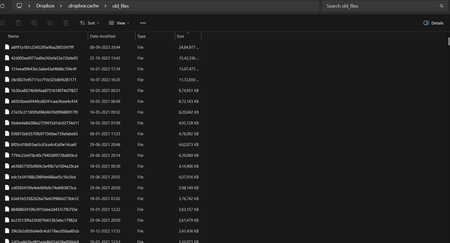
I deleted lot of my important data recently by misunderstanding of the app. Now I want to recover these files which are not available in "Deleted Files" section of website. but luckily I saw my files...
- 2 years ago
sparrsh wrote:
What are these types of files called? Can I restore it? Online or with help of any application?
There's no function to restore files from cache. You'd have to do it manually, assuming the files are complete. If they are the complete files, just rename them and include a proper file extension for whatever the file type is.

Rich Super User II
2 years agoSuper User II
sparrsh wrote:
What are these types of files called? Can I restore it? Online or with help of any application?
There's no function to restore files from cache. You'd have to do it manually, assuming the files are complete. If they are the complete files, just rename them and include a proper file extension for whatever the file type is.
 sparrsh2 years agoNew member | Level 2Yes I just did that. That is only way. Thanks man!!
About Delete, Edit, and Organize
Solve issues with deleting, editing, and organizing files and folders in your Dropbox account.
The Dropbox Community team is active from Monday to Friday. We try to respond to you as soon as we can, usually within 2 hours.
If you need more help you can view your support options (expected response time for an email or ticket is 24 hours), or contact us on X, Facebook or Instagram.
For more info on available support options for your Dropbox plan, see this article.
If you found the answer to your question in this Community thread, please 'like' the post to say thanks and to let us know it was useful!


