Your workflow is unique 👨💻 - tell us how you use Dropbox here.
Forum Discussion

Maryie
3 years agoExplorer | Level 3
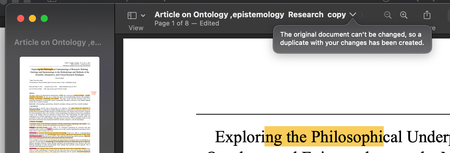
I cannot edit pdfs without creating a copy each time an edit is made.
Hi, I have my dropbox linked to my laptop's desktop so I can easily access it; after the latest macOS update I am getting a pop up message that says a copy will be made when I make any edits. Thi...

Megan Dropbox Community Moderator
3 years agoDropbox Community ModeratorHi Maryie, happy Monday!
Do you see the message that asks you if you want to keep a copy of the file; on all of your file types, or a specific one?
Also, does this happen with your Dropbox contents specifically or with files outside of your Dropbox folder too?
Feel free to share with me the app's version that you're using on the device.
Let me know more, and we'll take it from there!
 Maryie3 years agoExplorer | Level 3
Hi Megan!
Thanks for getting back to me so quickly, I really appreciate it!
This just happens with preview/ pdf files on my desktop and documents (doesn't happen with word documents), because both these folders from my mac have been linked to my dropbox.
It doesn't happen if I move the folders to another location within my dropbox. I've been told there may be some permission issues that may have gotten messed up when my laptop got the new OS?
My dropbox is version: 167.4.4719 and mac OS: Ventura 13.2
Thanks so much for your time! 🙂
- Megan3 years ago
Hi Maryie, to help isolate this issue, could you please try quitting the Dropbox app, and let me know if the issue persists?
Click the Dropbox icon in your menu bar, then click on your profile picture or initials to the right of the search bar and select "Quit Dropbox".
- Maryie3 years agoExplorer | Level 3
Hi Megan,
Ok so I've just tried that, quit the app, tried editing after that and before relaunching and once after relaunching. It's still the same 😞
About Delete, Edit, and Organize
Solve issues with deleting, editing, and organizing files and folders in your Dropbox account.
The Dropbox Community team is active from Monday to Friday. We try to respond to you as soon as we can, usually within 2 hours.
If you need more help you can view your support options (expected response time for an email or ticket is 24 hours), or contact us on X, Facebook or Instagram.
For more info on available support options for your Dropbox plan, see this article.
If you found the answer to your question in this Community thread, please 'like' the post to say thanks and to let us know it was useful!


