Our Community is in read-only mode until April 8th, learn more here. You can still search existing threads or get help via Dropbox Support, the Dropbox Help Center, or Learn.
Forum Discussion

Antriel
5 years agoExplorer | Level 4
I don't see the option to ignore a folder within my right click's context menu. Any ideas?
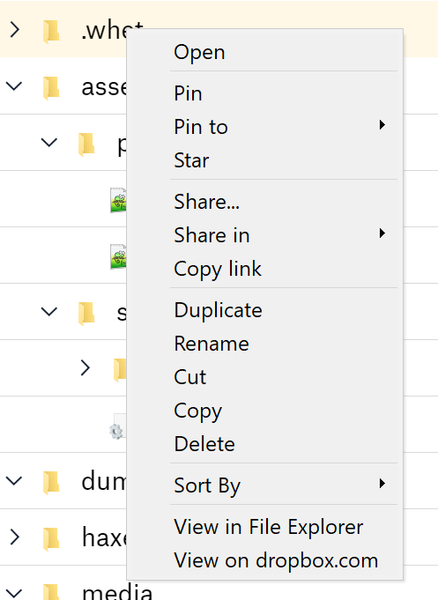
According to https://help.dropbox.com/files-folders/restore-delete/ignored-files there should be a "Don’t sync to dropbox.com" option. I don't see it. I'm not a business user. I'm using Windows 10 wi...
- 5 years ago
Hi Antriel; welcome to our Community and thanks for using Dropbox!
For starters, let me clarify that this option is available when viewing your files through our new desktop app and not through your File Explorer (or Finder for Macs).
That said, this feature is gradually rolling out to all of our users so you might want to use the alternative method to set a file/folder to be ignored:
Windows
- Open the PowerShell application on your computer.
- Type the code below, replacing the file/folder path placeholder with the file/folder path you’d like to ignore.
Set-Content -Path 'C:\Users\yourname\Dropbox\ (Personal)/YourFileName.pdf' -Stream com.dropbox.ignored -Value 1
3. Press enter on your keyboard.
The icon beside your file or folder will change to a gray minus sign indicating that it has been ignored.
Let me know how it goes!


Small Systems
5 years agoHelpful | Level 6
Hi, yes i'm doing this through the app, this is the menu that I get:

paxos
5 years agoExplorer | Level 4
Same here. Its gone for me, and it was there before.
This is definitly a bug.
About Delete, Edit, and Organize
Solve issues with deleting, editing, and organizing files and folders in your Dropbox account.
The Dropbox Community team is active from Monday to Friday. We try to respond to you as soon as we can, usually within 2 hours.
If you need more help you can view your support options (expected response time for an email or ticket is 24 hours), or contact us on X, Facebook or Instagram.
For more info on available support options for your Dropbox plan, see this article.
If you found the answer to your question in this Community thread, please 'like' the post to say thanks and to let us know it was useful!


