Our Community is in read-only mode until April 8th, learn more here. You can still search existing threads or get help via Dropbox Support, the Dropbox Help Center, or Learn.
Forum Discussion

Antriel
5 years agoExplorer | Level 4
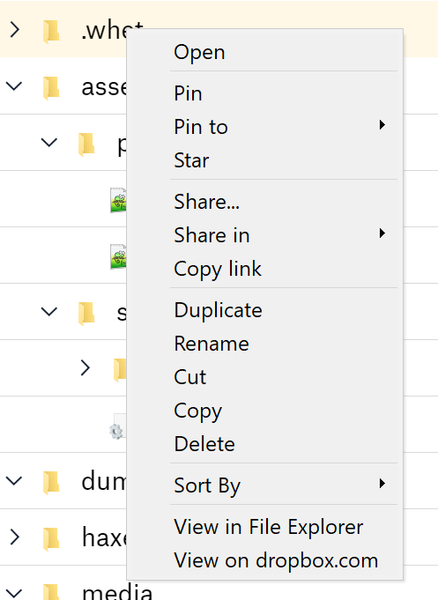
I don't see the option to ignore a folder within my right click's context menu. Any ideas?
According to https://help.dropbox.com/files-folders/restore-delete/ignored-files there should be a "Don’t sync to dropbox.com" option. I don't see it. I'm not a business user. I'm using Windows 10 wi...
- 5 years ago
Hi Antriel; welcome to our Community and thanks for using Dropbox!
For starters, let me clarify that this option is available when viewing your files through our new desktop app and not through your File Explorer (or Finder for Macs).
That said, this feature is gradually rolling out to all of our users so you might want to use the alternative method to set a file/folder to be ignored:
Windows
- Open the PowerShell application on your computer.
- Type the code below, replacing the file/folder path placeholder with the file/folder path you’d like to ignore.
Set-Content -Path 'C:\Users\yourname\Dropbox\ (Personal)/YourFileName.pdf' -Stream com.dropbox.ignored -Value 1
3. Press enter on your keyboard.
The icon beside your file or folder will change to a gray minus sign indicating that it has been ignored.
Let me know how it goes!


Jay Dropbox Community Moderator
5 years agoDropbox Community ModeratorThanks for the info, Small Systems, paxos. I'd recommend contacting the support team directly for further assistance on this matter, as they'll be able to investigate in more detail.

Small Systems
5 years agoHelpful | Level 6
I did, and they couldn't help at all...
See my ticket #11204247
- Jay5 years ago
Since it looks like the ticket is with a specialist team, only they would be able to assist further on this matter. I've prioritized the ticket to expedite matters on your behalf.
- Small Systems5 years agoHelpful | Level 6
Hello Jay,
Seriously, what's going on with this. Dropbox is a paid service and a feature you advertise simply does not work. The last reply on my open ticket for this was 26 days ago...
Thank you,
- Jay5 years ago
As this is with a specialist team I wouldn't be able to assist any further, unfortunately. I'd recommend replying to the ticket directly for an update.
 Damato5 years agoHelpful | Level 7
We just want the proposed sollution for the .dropboxignore file.
It does not have to be fancy, but since .gitignore is a standard for repositories, for sync it would breathe life into a problem thatdespirately needs as sollution, and has needed one for many years. Just ignore any path specified in the file, relative to the file. Don't tough it, don't even index it, it is going to change so allow me to tell you to ignore it.
I had to sit through a sync of 5000+ files last night because the command line "sollution" did not work, and I ended up with a conflicted "node_modules" folder. Great way to waste everyone's time.
Never has a company ignored it's clients to this extent, even Drew Houston has received tweets regarding this.- Small Systems5 years agoHelpful | Level 6
So the latest from my support ticket is:
"It looks like at present the feature is not available and currently working on a fix for this to be released out."
So, the right-click to ignore feature (mentioned on the help page) is not a feature...
https://help.dropbox.com/files-folders/restore-delete/ignored-files
Oh well
- Small Systems5 years agoHelpful | Level 6
FYI anyone here because of node_modules. Before installing your packages, manually create a node_modules folder and use the command line to ignore it. Once it has been ignored (grey icon with line) you can then install your node packages and DropBox will not index or sync them. It's a bit of a hassle but it works.
- Damato5 years agoHelpful | Level 7
I am getting so fed up with this situation, we have complained until we are blue in the face. If not for the huge commitment of moving everything over to Dropbox years ago, and the hassle of implementing an alternative.
I have no idea how this can just be disregarded, or put on the back burner without internal repercussions. It's probably one of the most requested features I have stumbled across, which may be confirmation bias.
Just goes to show that if the developer used it at home, they would have fixed it years ago already.  defaria4 years agoExplorer | Level 4
Great to know that support is dropping the ball... sigh
Meantime this doesn't work at all for me. First off, I'm on Linux and no person on Linux has ever used a path such as "/Users/yourname/Dropbox\ \(Personal\)/YourFileName.pdf". User's home directories do not go under /Users. That's Mac thing.
Second, after doing:
$ attr -s com.dropbox.ignored -V 1 /home/andrew/Dropbox/web
the directory "web" is not ignored. It still appears on the Dropbox websites and apps that sync to Dropbox.
Finally, this **bleep** forum site hoses my Brave browser! If I hover over things like the ordered list dropdown or the 3 dot menu in the formatting menubar Brave and the X server go nuts, Brave stops responding and I have to kill the browser. Not good. Apparently, the JavaScript involved in that menuing bar is messed up.
Meantime, please tell me how to ignore Dropbox files and folders on Linux. Do not point me to some desktop app - there is no desktop app for Linux. The "desktop app" merely installs the Dropbox daemon to sync things and added some minimum functionality to Nautilus (Linux's version of say Windows File Manager). There is no separate app and there is no "Ignore this file/folder" in the right click menu of Nautilus.
$ attr -s com.dropbox.ignored -V 1 /Users/yourname/Dropbox\ \(Personal\)/YourFileName.pdf
About Delete, Edit, and Organize
Solve issues with deleting, editing, and organizing files and folders in your Dropbox account.
The Dropbox Community team is active from Monday to Friday. We try to respond to you as soon as we can, usually within 2 hours.
If you need more help you can view your support options (expected response time for an email or ticket is 24 hours), or contact us on X, Facebook or Instagram.
For more info on available support options for your Dropbox plan, see this article.
If you found the answer to your question in this Community thread, please 'like' the post to say thanks and to let us know it was useful!


