Your workflow is unique 👨💻 - tell us how you use Dropbox here.
Forum Discussion

KJWSr
1 month agoExplorer | Level 4
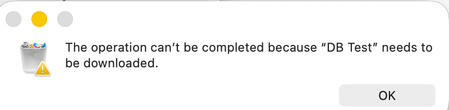
I get an error that my folder needs to be downloaded before deleting it from the desktop app.
Device
M1 iMac Operating System/Browser (if using the web)
MacOS Tahoe Dropbox App Version (if using the app)
238.4.6305
Question or Issue
I attempted to copy the contents of my l...

KJWSr
1 month agoExplorer | Level 4
Hi - Thanks for responding! How do I force the folder to download?
Thanks

Nancy Dropbox Community Moderator
1 month agoDropbox Community ModeratorHey KJWSr! You can try to right-click on the folder directly and select the “Make available offline” option.
After that, you’ll need to wait for the folder to be fully synced to your computer (basically you’ll need to wait till the syncing status of your Dropbox app shows as up to date).
- KJWSr1 month agoExplorer | Level 4
Hi Nancy - I've marked all flowers as Make Available Off line. But things aren't syncing, in addition to the can't delete issue. For some reason when I look at my account via the desktop icon it says aI'm using 4 TB of 4 TB. I'm actually using less than 3 TB.
My account online shows the actual usage.
About Delete, Edit, and Organize
Solve issues with deleting, editing, and organizing files and folders in your Dropbox account.
The Dropbox Community team is active from Monday to Friday. We try to respond to you as soon as we can, usually within 2 hours.
If you need more help you can view your support options (expected response time for an email or ticket is 24 hours), or contact us on X, Facebook or Instagram.
For more info on available support options for your Dropbox plan, see this article.
If you found the answer to your question in this Community thread, please 'like' the post to say thanks and to let us know it was useful!


