Your workflow is unique 👨💻 - tell us how you use Dropbox here.
Forum Discussion

KJWSr
1 month agoExplorer | Level 4
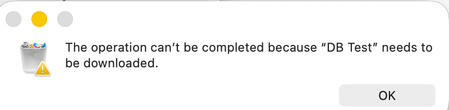
I get an error that my folder needs to be downloaded before deleting it from the desktop app.
Device
M1 iMac Operating System/Browser (if using the web)
MacOS Tahoe Dropbox App Version (if using the app)
238.4.6305
Question or Issue
I attempted to copy the contents of my l...

KJW_SR
1 month agoExplorer | Level 3
After yet more “Your drive is full” emails from Advance Support I took a scorched earth approach. I deleted the desk top app and erased the external drive. The drive is formatted as APSF(Encrypted). I then reinstalled the desktop app and reinitiated the sync process from the web. It appears to have worked. The Dropbox folder was created on the newly erased drive and the folder was populated with the correct folders. At present it is Indexing. Given the volume of files I expect indexing to take some time.
I apologize for this, but Dropbox support is dreadful. Email only support that does nothing but quote ‘user error’ boiler plate responses is unacceptable.
Kyle

Nancy Dropbox Community Moderator
1 month agoDropbox Community ModeratorThanks for sharing your solution with us, Kyle! I’m glad to hear that the desktop app seems to be working normally so far.
We also appreciate your feedback and I’ve make sure to pass it along to our team (if you wish, you can also share your ticket number here and I can leave an internal note with your comments).
- KJW_SR1 month agoExplorer | Level 3Hi - The ticket # is 2587562. Indexing finished and the last 2 folders are downloading. So it looks like scorched earth worked. If only I’d been able to get someone at Dropbox Support to acknowledge that the issue was the desktop app and not my drive.Kyle
About Delete, Edit, and Organize
Solve issues with deleting, editing, and organizing files and folders in your Dropbox account.
The Dropbox Community team is active from Monday to Friday. We try to respond to you as soon as we can, usually within 2 hours.
If you need more help you can view your support options (expected response time for an email or ticket is 24 hours), or contact us on X, Facebook or Instagram.
For more info on available support options for your Dropbox plan, see this article.
If you found the answer to your question in this Community thread, please 'like' the post to say thanks and to let us know it was useful!


