Need to see if your shared folder is taking up space on your dropbox 👨💻? Find out how to check here.
Forum Discussion

KEAlt
9 months agoNew member | Level 1
Naming conventions are sometimes buggy in subfolders.
I have a parent folder with an automation that's supposed to rename every file in its subfolders to a certain format, but it's been very buggy on if it actually works or not...
I don't know if it's just bugged or if there is a solution. I'm using file requests in every child folder if that helps.
23 Replies
- Jay9 months ago
Dropbox Community Moderator
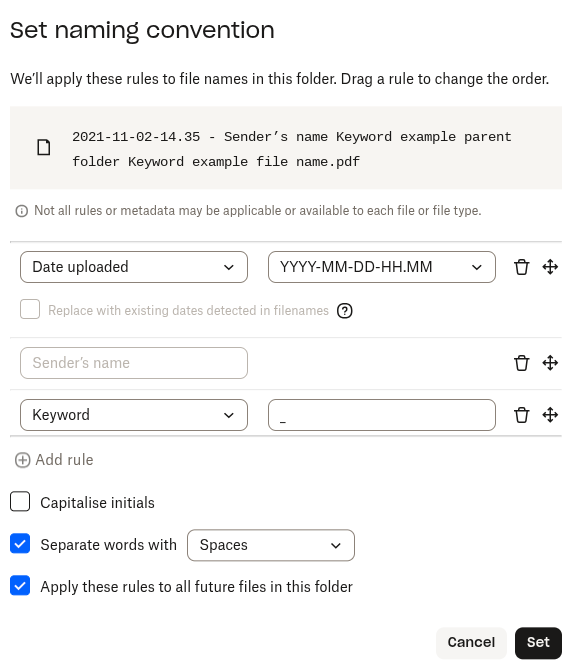
If you wish, you can try and see how that works on your implementation.
Just so you're aware, there's no guarantee it'll work correctly on previously uploaded files
 KEAlt9 months agoNew member | Level 1
The parent folder still doesn't have a naming convention option... Why is this?
- Jay9 months ago
After testing this some more, when you apply a naming convention, it becomes an automation immediately for that folder, and subfolders if you've enabled that feature.
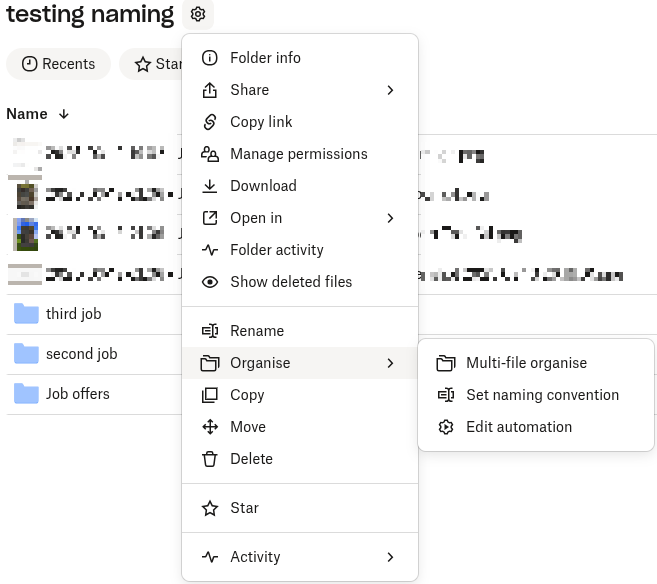
Could you attach a screenshot showing the options you get on the parent folder?
 TKEotK9 months agoExplorer | Level 4
It only has the automation option, not the other 2...
- Jay9 months ago
Are you seeing this in all your folders used for file requests, or just the parent folder?
- TKEotK9 months agoExplorer | Level 4
All folders. This used to not be the case...
One exception is a child folder of one of the child folders. It has all 3 organize options. - Walter9 months ago
Thanks for the clarification KEAlt
Would it be OK if we send you an email to have a further look internally at this point?
 MFM9 months agoNew member | Level 2
Yes. Please use this account's email though
- Jay9 months ago
Thanks, I've sent you an email, please could you reply to it when you get a chance?
- MFM9 months agoNew member | Level 2
We haven't heard back from yall yet.
Can we try to fix these problems?


About Delete, edit, and organize
Solve issues with deleting, editing, and organizing files and folders in your Dropbox account with support from the Dropbox Community.
The Dropbox Community team is active from Monday to Friday. We try to respond to you as soon as we can, usually within 2 hours.
If you need more help you can view your support options (expected response time for an email or ticket is 24 hours), or contact us on X, Facebook or Instagram.
For more info on available support options for your Dropbox plan, see this article.
If you found the answer to your question in this Community thread, please 'like' the post to say thanks and to let us know it was useful!


