Your workflow is unique 👨💻 - tell us how you use Dropbox here.
Forum Discussion

GretaB
3 years agoHelpful | Level 5
Not able to open files after uninstalling
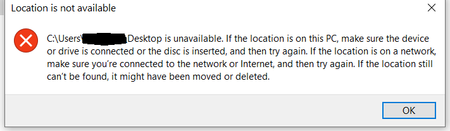
I uninstalled dropbox and I am not able to run certain folders. I get an error that I cant connect to the network to access my downloads folder plus many others. I know this is related to dropbox bec...
- 3 years ago
Since you've already uninstalled the Dropbox desktop application previously, the system folders may be elsewhere.
Could you try these steps to restore their original locations?

GretaB
3 years agoHelpful | Level 5
Because I already uninstalled Dropbox, I had to install it back again to be able to see the Dropbox preferences. Sadly, when opening "Backup"-> "Manage backups" I only see this .
This is where all the steps end, because I cant do anything else what it is said. I am still unable to move anything to other discs.

Jay Dropbox Community Moderator
3 years agoDropbox Community ModeratorSince you've already uninstalled the Dropbox desktop application previously, the system folders may be elsewhere.
Could you try these steps to restore their original locations?
- GretaB3 years agoHelpful | Level 5
This step worked! Thank you. I received all the missing files. Hopefully this doesn't happen again. Now - can I uninstall Dropbox without any losses? I didn't let the program create new backups or anything.
- Jay3 years ago
No worries, glad to have helped out. Enjoy the rest of your week!
About Delete, Edit, and Organize
Solve issues with deleting, editing, and organizing files and folders in your Dropbox account.
The Dropbox Community team is active from Monday to Friday. We try to respond to you as soon as we can, usually within 2 hours.
If you need more help you can view your support options (expected response time for an email or ticket is 24 hours), or contact us on X, Facebook or Instagram.
For more info on available support options for your Dropbox plan, see this article.
If you found the answer to your question in this Community thread, please 'like' the post to say thanks and to let us know it was useful!


