We’re Still Here to Help (Even Over the Holidays!) - find out more here.
Forum Discussion

Wright T.
11 months agoNew member | Level 1
Specific files vanished from shared folder - no delete event, no trace.
Longtime Dropbox customer, first time complainer - paying customer for a few years now.
So first, please understand that before submitting a support ticket, I did my due diligence with an exhaustive search of all sync'd folders as well as my hard drive. The only other customer with shared access did the same on his system. The files in question had not been edited or otherwise accessed in about 9 months, so tracing back to find those events was very time-consuming since I use Dropbox every day and have many events to sort through. I never did trace all the way back that long, and decided it was time to involve Dropbox support.
Support, which was probably an AI Chatbot of some sort, went through the basics, even though I told them I had already done that. Regardless, they -required- that I provide every detail of information about the folder, last access of files, etc., over and over, including screen shots to show the files weren't in either place (computer or website folders).
After days of this back and forth, they found the last events, from 9 months ago, which were edits. They suggested clicking on those edit links and downloading the files, which I did, and which were empty or corrupted files. Note that NO EVENT was shown about moving, removing, deleting files, etc. from any source.
Cutting to the chase, "support" closed the ticket as "solved" without ever once finding the actual files, what happened to them, when or why. They claimed at least a few times that "Dropbox can not delete, move or remove files".
I posted a Google review of this incident, and just read a reply that I should post on this forum as well as the "X" presence, but since I don't belong to "X" (Twitter), this is as far as I'll go with it. I expect very little from this forum in the way of a solution or getting my files back, in tact, but consider this the remainder of my due diligence.
Because of this incident, which as far as I know is the only one, my trust in Dropbox is approximately ZERO, so I have purchased an external backup hard drive - WHICH I SHOULD NOT HAVE HAD TO PURCHASE - because Dropbox was supposed to be that backup source!
If you think you can help, or know some trick the Dropbox "support" doesn't know, I welcome your reply. If you're a "SuperUser" that just wants to tell me it was my fault, then please refrain. I've read a number of condescending responses trying to hang the user out to dry, which is simply childish. There is NO EXCUSE for a single file going missing from Dropbox without, at the very least, an event log showing when, why, where, who and how.
2 Replies
- Jay11 months ago
Dropbox Community Moderator
Hi Wright T., thanks for bringing this to our attention.
There are many potential reasons as to why a file is deleted from any folder on your account.
While not a full list, this thread does give a list of potential reasons as to why a file was removed from your account.
Are you able to open the shared folder and then click the 'Show deleted files' option from the gear icon next to the folder name, as seen below:
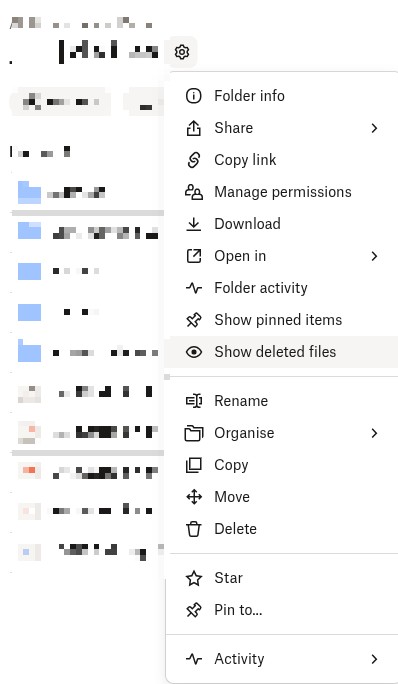
If you find it there, you can then directly view the version history for that file and let me know what it says.
This will help me to assist further!
 Wright T.11 months agoNew member | Level 1
The "deleted files" function you illustrated doesn't work here, because I downloaded the (empty/corrupt) files from their last 'events' which occurred at the end of March 2024. Because those files were useless, I deleted them, and those are the files that show up when I perform that function you suggested.
Let's face it, Dropbox failed, and failed bad, and it's costing me a lot of time to recreate those files, which were customer drawings. I'm considering myself lucky that it was under 20 files that were lost, and I had PDF copies to help recreate them. It could just as easily have been far more important or sensitive documents, so lesson learned - Dropbox can not be trusted as safe file storage and most certainly not as a backup resource!

About Delete, edit, and organize
Solve issues with deleting, editing, and organizing files and folders in your Dropbox account with support from the Dropbox Community.
The Dropbox Community team is active from Monday to Friday. We try to respond to you as soon as we can, usually within 2 hours.
If you need more help you can view your support options (expected response time for an email or ticket is 24 hours), or contact us on X, Facebook or Instagram.
For more info on available support options for your Dropbox plan, see this article.
If you found the answer to your question in this Community thread, please 'like' the post to say thanks and to let us know it was useful!


