Your workflow is unique 👨💻 - tell us how you use Dropbox here.
Forum Discussion

EOuser
2 years agoExplorer | Level 3
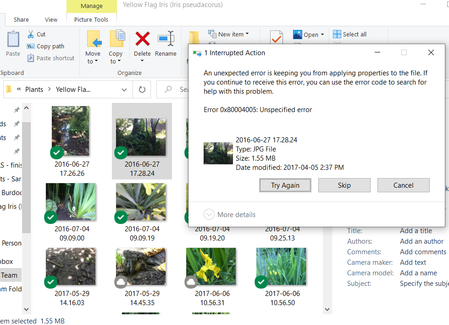
Tagging directly using File Explorer, but some files get an unspecified error, while others don't.
Hello,
The company I work for uses Dropbox to share a lot of photos with each other, however, we have implemented a tagging system that is based in file explorer (we don't use the dropbox taggi...

EOuser
2 years agoExplorer | Level 3
Hi Megan,
Thanks for your reply.
My Dropbox is up to date: 180.4.4912
All of our files are Jpg/Jpeg images - so some jpgs are fine, and other jpgs are untaggable (but this is inconsistent among my colleagues, as they can tag some jpgs that I can't, and vice versa).
I'm not sure how to tag the image while the app is closed, because I access the images by opening Dropbox and navigating to them. It is not saved on my laptop unless I download it.
Here's one peculiar thing I noticed:
There was one specific image that I couldn't tag, so I asked my colleagues to see if they could tag it.
Most of them reported back that they could tag it. After this I tried again and could tag it as well.
I'm wondering if the tagging might have to do with synchronization on the dropbox accounts, because once everyone else opened the image, my account was able to tag it too?
Let me know if this makes sense!

Hannah Dropbox Community Moderator
2 years agoDropbox Community ModeratorHey EOuser, sorry to jump in here.
Like Megan mentioned, this tagging feature is actually provided by your computer's OS and not Dropbox.
We do have a tagging feature, which you can access only through our website, at the moment.
Now, if you mark your files as "available offline" and then quit the Dropbox app, do you see the same behavior, when navigating to the files through the Dropbox folder in file explorer?
About Delete, Edit, and Organize
Solve issues with deleting, editing, and organizing files and folders in your Dropbox account.
The Dropbox Community team is active from Monday to Friday. We try to respond to you as soon as we can, usually within 2 hours.
If you need more help you can view your support options (expected response time for an email or ticket is 24 hours), or contact us on X, Facebook or Instagram.
For more info on available support options for your Dropbox plan, see this article.
If you found the answer to your question in this Community thread, please 'like' the post to say thanks and to let us know it was useful!


