Your workflow is unique 👨💻 - tell us how you use Dropbox here.
Forum Discussion

tjanderson
4 years agoHelpful | Level 6
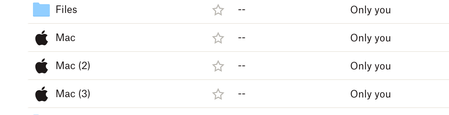
Turning on dropbox backup but folder name is weird
I had tested the Dropbox Backup feature in the past so I know that when turned on my Computers should be added as My Mac (Unique Mac Name). I decided to turn it back on again when setting up two new ...
 2 years ago
OK, they are finally rolling up a Beta update for Dropbox Backup that will let you rename and I was able to do it! You can do go through Dropbox Backup in the app, disable the backups on all the computers there, and then restart them. Then, re-enable backups and it should move you over to beta so you can now rename things!

SNANA51832
4 years agoExplorer | Level 4
I reinstalled my operating system a few days ago and these two folders are not visible to me and show up on the new one as the PC folder. You can see the picture here.https://imgur.com/gallery/mGhrwen
But in dropbox, it will show this.https://imgur.com/5XcXvfi
After I reinstalled my operating system, I move all my desktop files from PC to PC2.So the PC folder is empty.And I can't delete it nor can i rename the PC2 folder.
And the dropbox desktop software will contain a PC2 folder.https://imgur.com/ka8UPxN
Look forward to your favourable reply.

Jay Dropbox Community Moderator
4 years agoDropbox Community ModeratorThanks for the info, SNANA51832, this is related to the computer backup feature.
Could you check if the old computer has been removed from the list of devices on this page?
Could you check if the old computer has been removed from the list of devices on this page?
- SNANA518324 years agoExplorer | Level 4
Sorry for the late reply,but it is always the PC2 folder.Though I have deleted all my devices and folders on dropbox, and I resynced, it will create the same PC2 folder.
- Hannah4 years agoHey SNANA51832, thanks for the update here.
You won't really be able to rename the PC(2) folder, I'm afraid.
And even though the computer was unlinked, it's still the same computer, and Dropbox recognizes that, so the backup folder will keep getting named 'PC(2)'.
Now, since the first 'PC' folder is empty, though, now that that computer is unlinked, were you able to delete it? milesdudley4 years agoHelpful | Level 5
I have the same problem.
I have tried all teh steps above.
THIS should now be the only PC being abcked up ALL OTERS HAVE BEEN DEACTIVAED AND REMOVED however it still list this PC as #2. This is frustration. I HATE IT!
Please allow us a way to rename this folder.

About Delete, edit, and organize
Solve issues with deleting, editing, and organizing files and folders in your Dropbox account with support from the Dropbox Community.
The Dropbox Community team is active from Monday to Friday. We try to respond to you as soon as we can, usually within 2 hours.
If you need more help you can view your support options (expected response time for an email or ticket is 24 hours), or contact us on X, Facebook or Instagram.
For more info on available support options for your Dropbox plan, see this article.
If you found the answer to your question in this Community thread, please 'like' the post to say thanks and to let us know it was useful!


