Your workflow is unique 👨💻 - tell us how you use Dropbox here.
Forum Discussion

tjanderson
4 years agoHelpful | Level 6
Turning on dropbox backup but folder name is weird
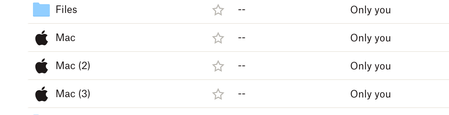
I had tested the Dropbox Backup feature in the past so I know that when turned on my Computers should be added as My Mac (Unique Mac Name). I decided to turn it back on again when setting up two new ...
 2 years ago
OK, they are finally rolling up a Beta update for Dropbox Backup that will let you rename and I was able to do it! You can do go through Dropbox Backup in the app, disable the backups on all the computers there, and then restart them. Then, re-enable backups and it should move you over to beta so you can now rename things!
tjanderson
3 years agoHelpful | Level 6
Hannah Hopefully you can pass this along to the Product Owner for Dropbox backup cause this is still a MAJOR downfall to Dropbox backup and to me makes the claim listed in the dropbox backup marketing https://www.dropbox.com/backup?_tk=social extremely suspect.
Also the marketing slide does not accurately reflect how Backup actually works. What the picture shows the name as Cobalt in reality is going to be Mac (4) or Windows (2). Maybe the feature to use computer name instead of the OS is rolling out but for now all I see is a lot of false claims from what Dropbox says they do and what they actually do. Would love to see that change

Rich Super User II
3 years agoSuper User II
tjanderson wrote:
Maybe the feature to use computer name instead of the OS is rolling out ...
It's actually the other way around. The feature used to use the computer name for the backup folder name, but it was changed (for simplicity reasons?!) to use PC or Mac with a number appended.
About Delete, edit, and organize
Solve issues with deleting, editing, and organizing files and folders in your Dropbox account with support from the Dropbox Community.
The Dropbox Community team is active from Monday to Friday. We try to respond to you as soon as we can, usually within 2 hours.
If you need more help you can view your support options (expected response time for an email or ticket is 24 hours), or contact us on X, Facebook or Instagram.
For more info on available support options for your Dropbox plan, see this article.
If you found the answer to your question in this Community thread, please 'like' the post to say thanks and to let us know it was useful!


