We’re Still Here to Help (Even Over the Holidays!) - find out more here.
Forum Discussion

willdingo
8 months agoExplorer | Level 3
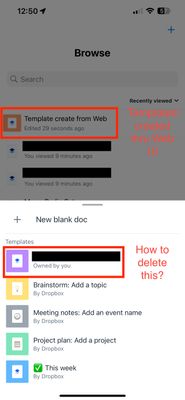
Unable to delete Paper template
I'm on the migrated new release of Dropbox Paper. I was on the old one when I had created a Paper template. This old template doesn't show up in the web version of the Dropbox Paper and I'm not able...

Hannah Dropbox Community Moderator
8 months agoDropbox Community ModeratorWelcome to our Community, willdingo.
I tried to recreate this and everything works fine for me, I can see my template online and on the iOS Paper app and can delete it from both locations.
If you open the template from the Paper app and then tap on the "..." (ellipsis) icon at the top right corner, do you see a "delete" option?
If not, can you send me a screenshot of what you see?
Thanks!
About Delete, edit, and organize
Solve issues with deleting, editing, and organizing files and folders in your Dropbox account with support from the Dropbox Community.
The Dropbox Community team is active from Monday to Friday. We try to respond to you as soon as we can, usually within 2 hours.
If you need more help you can view your support options (expected response time for an email or ticket is 24 hours), or contact us on X, Facebook or Instagram.
For more info on available support options for your Dropbox plan, see this article.
If you found the answer to your question in this Community thread, please 'like' the post to say thanks and to let us know it was useful!


