Your workflow is unique 👨💻 - tell us how you use Dropbox here.
Forum Discussion

NGraham1
6 years agoNew member | Level 2
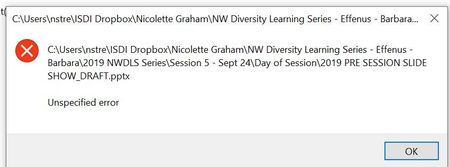
Unspecified Error trying to open word, excel or PowerPoint files
Hello,
I have a fairly new laptop that was purchased in March that I use for all my personal and professional work. I started a new gig with a company in June and was given access to their Dropbox...
- 6 years ago
Hi NGraham1!
I understand you are not able to open certain files via the Dropbox desktop app.
Is there any chance the files are currently Smart Synced to 'online-only'? If so, there will be a gray cloud icon by the files, and you can right-click on them and set their Smart Sync setting to 'Local'.
Alternatively, some applications have limits on the file paths they can access (for example, Excel has a limit of 218 total characters), and so shortening the entire name/path to the file may help.
You can check all of our sync icons and possible syncing issues here, too, for reference.
If the file is local and the file length is not the issue, can you copy the file to outside of the Dropbox folder and see if you can open it then? This will help determine if this is syncing issue or a file-specific one.
Let me know what you find, thanks!

Mike-B
6 years agoNew member | Level 2
Lusil wrote:If you want to edit it, you'll have to make it local, so that the relevant information becomes available for you to make changes.
Hi Lusil
We have team members that have this same problem.
Can you please point me to the support documentation that covers this limitation? We were under the impression that Smart-sync'ed files would still be "openable". This seems like a severe limitation that I have somehow completely missed! Luckily our DB Business plan is still within the trial period. Looking forward to some clarafication.
Cheers.

Lusil Dropbox Staff
6 years agoDropbox StaffHey Mike-B, I'd be more than happy to help!
Online-only files save space on your hard drive by taking up as little storage as possible. In this case, only specific information is downloaded, such as the name and the path.
For a third party app on your computer to open a file, it needs to have all the relevant information available, which can be done by converting a file to local.
You can find more details about Smart Sync, and online-only files in this article.
Hope this helps to some extent!
 rdinsf5 years agoHelpful | Level 6
OK, now I understand that if I have an MS Word file set to online only, just clicking on the file name won't work - have to set the file to local first.
Except....Wordperfect (only used by laywers I think these days) CAN BE OPENED while set to online only just by clicking on the file name in Windows Explorer.
Why the different behavior?
About Delete, Edit, and Organize
Solve issues with deleting, editing, and organizing files and folders in your Dropbox account.
The Dropbox Community team is active from Monday to Friday. We try to respond to you as soon as we can, usually within 2 hours.
If you need more help you can view your support options (expected response time for an email or ticket is 24 hours), or contact us on X, Facebook or Instagram.
For more info on available support options for your Dropbox plan, see this article.
If you found the answer to your question in this Community thread, please 'like' the post to say thanks and to let us know it was useful!


