Our Community is in read-only mode until April 8th, learn more here. You can still search existing threads or get help via Dropbox Support, the Dropbox Help Center, or Learn.
Forum Discussion

Zandiver
2 years agoHelpful | Level 5
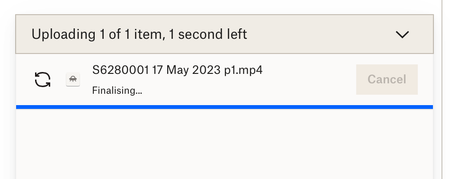
1.84 GB mp4 sync stuck on "finalizing" during website upload
My iMac keeps freezing because it's having problems uploading and syncing a 1.84 GB mp4 file. I have v175.4.5569 of the desktop app installed. This has been going on for 3 days now. I've checked my p...

Zandiver
2 years agoHelpful | Level 5
I set the upload going last night before I went to bed. I saw that it was uploading okay, albeit slowly, and went to bed when it was about 1.2 GB uploaded. In the morning it was stuck on "finalizing" again. Upload failed. I have verified that the file is not corrupted by playing the first few minutes of the mp4. Interestingly, it is part 1 of 3 videos and parts 2 and 3 have synced no problem. The original recording was split into 3 parts to send to me, which I then downloaded and saved locally. After that it should have automatically synced to Dropbox, but instead the fun & games started!

Jay Dropbox Community Moderator
2 years agoDropbox Community ModeratorDo you have the Dropbox desktop application installed on your machine? This would allow you to upload the file by moving it into the local Dropbox folder.
- Zandiver2 years agoHelpful | Level 5
Yes, v175.4.5569.
Syncing via the desktop app is where I originally had the hanging problem and why I moved to trying the web uploader method. Neither are working for me.
The file is still in my local Dropbox folder and still won't upload via the desktop app. All other files are updating no problem. Just that one is a problem. It's very weird.
- Jay2 years ago
What is the current status of the Dropbox desktop application when you click the icon in the menu bar?
What syncing icon does the video have in Finder?
- Zandiver2 years agoHelpful | Level 5
Desktop app status: Updating "filename p1.mp4"
Desktop app icon shows uploading in progress.
No syncing icons showing in Finder for any files at all.
About Create, Upload, and Share
Find help to solve issues with creating, uploading, and sharing files and folders with Dropbox.
The Dropbox Community team is active from Monday to Friday. We try to respond to you as soon as we can, usually within 2 hours.
If you need more help you can view your support options (expected response time for an email or ticket is 24 hours), or contact us on X, Facebook or Instagram.
For more info on available support options for your Dropbox plan, see this article.
If you found the answer to your question in this Community thread, please 'like' the post to say thanks and to let us know it was useful!


