Your workflow is unique 👨💻 - tell us how you use Dropbox here.
Forum Discussion

marcelleqb
1 year agoNew member | Level 2
Can I password protect folders while on a Family plan?
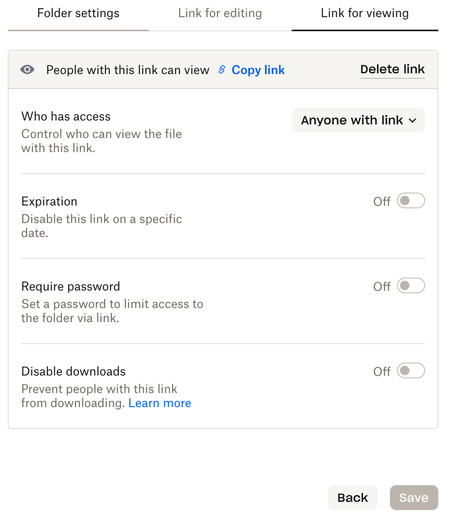
I have created a link for viewing and other than "who has access" all other toggles are greyed out. I have the Family plan https://www.dropbox.com/family and unfortunately, I cannot find anything tha...
- 1 year ago
marcelleqb wrote:
I cannot find anything that specifically tells me whether this option is allowed or not.
The option to require a password for a shared link is not available on the Family plan. The Family plan is basically the Plus plan with additional members. Shared link permissions are available on the Dropbox Professional, Essentials, Standard, Advanced, Business, Business Plus, and Enterprise plans.

Rich Super User II
1 year agoSuper User II
marcelleqb wrote:
I cannot find anything that specifically tells me whether this option is allowed or not.
The option to require a password for a shared link is not available on the Family plan. The Family plan is basically the Plus plan with additional members. Shared link permissions are available on the Dropbox Professional, Essentials, Standard, Advanced, Business, Business Plus, and Enterprise plans.
 marcelleqb1 year agoNew member | Level 2
Thank you.
It's crazy this is a not a feature of all the paid plans.
About Create, Upload, and Share
Find help to solve issues with creating, uploading, and sharing files and folders with Dropbox.
The Dropbox Community team is active from Monday to Friday. We try to respond to you as soon as we can, usually within 2 hours.
If you need more help you can view your support options (expected response time for an email or ticket is 24 hours), or contact us on X, Facebook or Instagram.
For more info on available support options for your Dropbox plan, see this article.
If you found the answer to your question in this Community thread, please 'like' the post to say thanks and to let us know it was useful!


