Our Community is in read-only mode until April 8th, learn more here. You can still search existing threads or get help via Dropbox Support, the Dropbox Help Center, or Learn.
Forum Discussion

mattiaa
3 years agoExplorer | Level 3
Can no longer copy folder link from Mac OS Finder
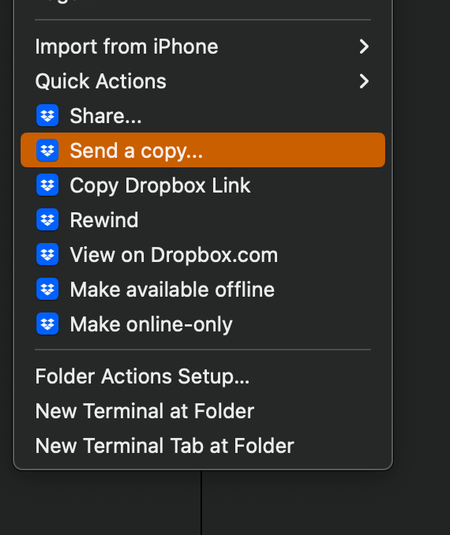
hello, Mac OS Ventura 13.0.1 (22A400) - when I right click on a folder and select "Copy Dropbox link" nothing is copied to the clipboard. I have restarted Finder, restarted the machine, reinstalled ...

mattiaa
3 years agoExplorer | Level 3
all the info you ask for is already posted by me in this thread, thank you.

Walter Dropbox Community Moderator
3 years agoDropbox Community ModeratorHey Mandy_Yuille1 & mattiaa, could you confirm that you've granted full disk access to Dropbox as outlined here?
If you did and this persists, a screenshot of the app's exact status as shown in your menu bar would be much appreciated.
In the meantime, you can use the website instead.
- mattiaa3 years agoExplorer | Level 3
no dice. and my Mac settings are different from the ones linked in that article. for example I dont have any of this under Accessibility:
- In the menu on the left, click Accessibility.
- Check the box next to Dropbox.
screenshot of dropbox app status from menu bar:
- Walter3 years ago
Can you send us the full-page screenshot so that we can see if the app is 'up to date' or still syncing mattiaa?
Also, could you take a look at the app's preferences under the Sync tab and let us know where your Dropbox folder is located?
- mattiaa3 years agoExplorer | Level 3
sure, thanks:
 Mandy_Yuille13 years agoNew member | Level 2
My files and sync are both up to date. Problem persists
- Walter3 years ago
Thank you both for your updates mattiaa & Mandy_Yuille1 - much appreciated.
Can you please confirm that you're not having any issues with sharing links to your files or folders when you do it through our website instead of the desktop app?
- Mandy_Yuille13 years agoNew member | Level 2
I am able to share links from the website, just not from finder.
- mattiaa3 years agoExplorer | Level 3
getting links from the dropbox website/account is no issue. I am also using DB on an another Apple MBP M1 Pro 14" I own with
Ventura 13.1 (22C65) and have no issues there, also with DB app v167.4.4719. thanks. - Walter3 years ago
Thanks for clarifying that for me mattiaa & Mandy_Yuille1
Could you try reinstalling the app and let me know how it goes?
- mattiaa3 years agoExplorer | Level 3
I already did that and no dice. I already specified that info in this thread. thanks.
- mattiaa3 years agoExplorer | Level 3
yes pls, what info do you need from me to email me?
 Gr8sons3 years agoHelpful | Level 5
Since there are more than one of us looking for a solution here, please post whatever you learn that might help.
 rastro23 years agoExplorer | Level 4
Hello,
I am having the same issue and tried all of these solutions.
The "Copy Dropbox Link" option is there in the finder, but when I try to paste the link, nothing happens.
Mac OS Ventura 12.3
Dropbox 168.4.4802
Dropbox has Full Disk Access in System Preferences, I've quit dropbox and restarted my computer. I am able to share the link from my browser, but not from the Finder.
Let me know if anyone has solved this problem.
Thanks,
Joe
- Megan3 years ago
Hi rastro2, how are you today?
You mentioned you're facing the same issue in regards to shared links when using the app, as the OP.
Have you also tried uninstalling the app, and then re-installing it back to the device? If so, can I then send you an email, in order for us to have a closer look into this?
Keep me posted!
- rastro23 years agoExplorer | Level 4
Yes I just tried uninstalling the app and reinstalling, and the same issue.
- Walter3 years ago
Hey rastro2, sorry to jump in here, but could you clarify if your shared links from the website are working normally or giving an error?
You can try them through an incognito window to test this out.
I'm just wondering if your shared links have been banned somehow, this is why I'm asking.
- Gr8sons3 years agoHelpful | Level 5
Walter, I'll jump back in. For me it's only the shared link that *should* be generated by the Dropbox app. I can generate and use/share the link from a browser.
Further clarifying: the Dropbox app no longer generates anything to the clipboard. Whatever was on the clipboard before selecting Copy Dropbox Link remains; the menu selection seems to do nothing.
- rastro23 years agoExplorer | Level 4
OK. Until recently the link was always copied to the clipboard in the Finder. It just suddenly stopped working, even though "Copy Dropbox Link" is still an option when control-clicking on a file or folder. I guess you're saying that the only workaround is to copy the link from the browser. If anyone is able to copy and paste the link using the clipboard in the Finder in Mac OS, let me know. It's definitely easier that way.
 roxyk3 years agoHelpful | Level 5
Hello. Was there a solution to this issue, as I am experiencing the same thing and it's causing a disrupt to my workflow?
- rastro23 years agoExplorer | Level 4
Still an issue for me and I can't seem to find a solution anywhere. Considering switching to Google Drive, but I have many files stored in Dropbox (and I'm paying for it until October). Grrr.
- Megan3 years ago
Hi roxyk & rastro2, happy Monday, wishing you both well!
Since you're facing the same issue as many others mentioned throughout this thread, have you also tried the troubleshooting steps mentioned here?
I'm asking, in order to know where you stand, and what we need to try next.
If you could also clarify the version of the app, that you're using on your end, that'd be fabulous.
Thanks a bunch!
- roxyk3 years agoHelpful | Level 5
I have uninstalled and reinstalled the app, as well as restarted my computer several times. I believe this is an issue caused by the new Mac OS software Ventura, as I didn't have this issue before upgrading to the new OS version, as well as experiencing other issues related to Ventura. Dropbox version is 169.4.5684
- Jay3 years ago
Hi roxyk, thanks for the info, I'd recommend contacting the support team directly for further assistance on their end.
- rastro23 years agoExplorer | Level 4
Same here. The issue started with Ventura. I have uninstalled and reinstalled dropbox. Quit and restarted it. Shut down the computer and restarted, etc.


About Create, Upload, and Share
Find help to solve issues with creating, uploading, and sharing files and folders with Dropbox.
The Dropbox Community team is active from Monday to Friday. We try to respond to you as soon as we can, usually within 2 hours.
If you need more help you can view your support options (expected response time for an email or ticket is 24 hours), or contact us on X, Facebook or Instagram.
For more info on available support options for your Dropbox plan, see this article.
If you found the answer to your question in this Community thread, please 'like' the post to say thanks and to let us know it was useful!


