Our Community is in read-only mode until April 8th, learn more here. You can still search existing threads or get help via Dropbox Support, the Dropbox Help Center, or Learn.
Forum Discussion

mattiaa
3 years agoExplorer | Level 3
Can no longer copy folder link from Mac OS Finder
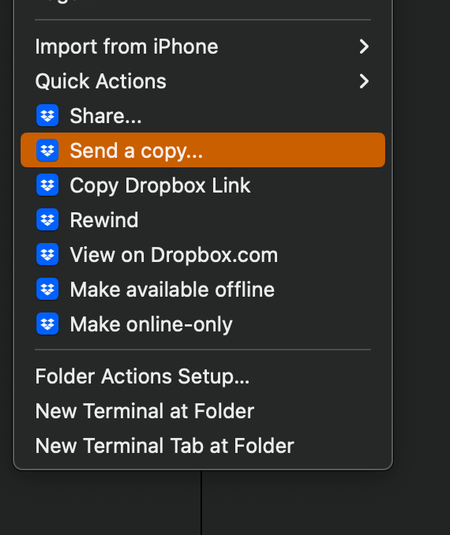
hello, Mac OS Ventura 13.0.1 (22A400) - when I right click on a folder and select "Copy Dropbox link" nothing is copied to the clipboard. I have restarted Finder, restarted the machine, reinstalled ...

rastro2
3 years agoExplorer | Level 4
Still an issue for me and I can't seem to find a solution anywhere. Considering switching to Google Drive, but I have many files stored in Dropbox (and I'm paying for it until October). Grrr.

Megan Dropbox Community Moderator
3 years agoDropbox Community ModeratorHi roxyk & rastro2, happy Monday, wishing you both well!
Since you're facing the same issue as many others mentioned throughout this thread, have you also tried the troubleshooting steps mentioned here?
I'm asking, in order to know where you stand, and what we need to try next.
If you could also clarify the version of the app, that you're using on your end, that'd be fabulous.
Thanks a bunch!
 roxyk3 years agoHelpful | Level 5
I have uninstalled and reinstalled the app, as well as restarted my computer several times. I believe this is an issue caused by the new Mac OS software Ventura, as I didn't have this issue before upgrading to the new OS version, as well as experiencing other issues related to Ventura. Dropbox version is 169.4.5684
- Jay3 years ago
Hi roxyk, thanks for the info, I'd recommend contacting the support team directly for further assistance on their end.
- rastro23 years agoExplorer | Level 4
Same here. The issue started with Ventura. I have uninstalled and reinstalled dropbox. Quit and restarted it. Shut down the computer and restarted, etc.
- rastro23 years agoExplorer | Level 4
Dropbox application is 169.4.5684
Location is: Macintosh HD/Users/##username##/Dropbox
Same issue for both Mac Studio and MacBook Pro
- Walter3 years ago
Hey roxyk, sorry to jump in here, but could you download and install the latest stable version (just got out btw) and let us know if this persists?
 Gr8sons3 years agoHelpful | Level 5
I'm one of the early posters to this issue.
Just downloaded and installed Dropbox v170.4.5895. Restarted.
No joy on Copy Dropbox Link menu option.
Also, Dropbox no longer auto-launches at startup. (likely a separate issue)
Retina 5K, 27-inch, 2019
3.6 GHz 8-Core Intel Core i9
Ventura 13.2.1 (22D68)
Dropbox folder is at user~Library~CloudStorage~Dropbox~all expected linked folders in place
- Megan3 years ago
Hi Gr8sons, I hope you're doing well!
Now, onto what you mentioned: Starting with the auto-launch of the app.
If you access your app's preferences, under your General tab, do you see the option Start Dropbox on system startup as selected? If so, can you try to unselected, then select it once again?
As for the context menu, could you send me a screenshot of what you see when you right click on a file, inside of your Dropbox folder, please?
Keep me posted, and we'll take it from there!
- rastro23 years agoExplorer | Level 4
It seems to be working for me after installing the latest update.
- Jay3 years ago
Glad to hear it was resolved, let us know if you have any further queries in the future!
- Gr8sons3 years agoHelpful | Level 5
Like several others, including myself, have described the Dropbox menu opens and the options appear but when clicking on the Copy Dropbox Link nothing is copied into the Clipboard: it's either empty or whatever was previously copied in any other context remains.
To further clarify, all of the files are properly uploaded to Dropbox and I can create/copy a link from a browser. Like everyone else, I'd grown accustomed to being able to do it from the desktop without the additional steps/hassle of logging in via a browser.
Re the auto-launch option. I've deselected, then restarted, then reselected, then restarted the Start Dropbox on system startup. No joy. And this is after several delete/reinstall cycles for the app itself. Having to manually launch the Dropbox app is less of a hassle, however, than the missing Copy Dropbox Link function.
- rastro23 years agoExplorer | Level 4
I'm jumping in here. I'm on Mac OS Ventura 13.2.1 and there are no checkmarks next to any of my Dropbox folders, so I can't tell which folders are local and which are offline.
I tried the previous solution, but Dropbox Finder Integration is not an option when I go to Finder Extensions (which is now located in Privacy and Security). In fact, Dropbox is not found in Finder Extensions, though it does show up in Added Extensions. The only options that I can check there are Finder Extensions and Sharing.
Please help. My hard drive is getting full!
Thanks!
Joe McGinty - Megan3 years ago
Hi rastro2, could you try to do a quick re-install of the app, using this link?
Once you do that, can you also clarify the app's exact syncing status at the moment?
Thanks a bunch!
- rastro23 years agoExplorer | Level 4
OK. I had just reinstalled Dropbox because of another issue, "Copy Dropbox Link" not working. This is the version I just installed.
https://www.dropboxforum.com/t5/Dropbox-desktop-client-builds/Stable-Build-170-4-5895/td-p/669962
I'm not sure if I should install an earlier version, b/c I'm afraid the previous issue may return.
- Gr8sons3 years agoHelpful | Level 5
Of course
- rastro23 years agoExplorer | Level 4
Yes, I just downloaded using that link. It seems I'm able to copy the link, but I'm still not seeing the checkmarks.
The dropbox app reads Your Files Are Up To Date.
- Megan3 years ago
Hi rastro2, would you mind trying these steps to see if they help?
Click on the Dropbox icon in your menu bar and quit the application
Open your Activity Monitor from your Mac Utilities folder
Force quit out of the instances of the Dropbox application that are running by searching for "Dropbox" in the search bar, then clicking on the "x" force quit icon on the top left
Re-start Dropbox from the applications folder by double clicking on the Dropbox application
Click on the Apple icon in the top left of your screen
Click on "force quit"
Relaunch the finder
If this doesn't improve the icon situation, feel free to send me a screenshot as to how the files and folders look inside your Dropbox folder, so I can have visual too.
- rastro23 years agoExplorer | Level 4
I tried all of those steps, and it didn't help.
I've attached a screen shotl
BTW, this is happening on both of my Macs. A 2021 14 inch MacBook Pro, and my new Mac Studio. Both running Ventura OS 13.2.1I've attached a screen shot from my MacBook Pro. As you can see, there are no checkmarks next to the folders.
- Megan3 years ago
Hi rastro2, it will sound trivial but have you tried restarting your device?
If you have, I'd suggest that you try an advanced reinstall, and come back with the results.
- rastro23 years agoExplorer | Level 4
I did all of that, including the advanced reinstall, but still no checkmarks.


About Create, Upload, and Share
Find help to solve issues with creating, uploading, and sharing files and folders with Dropbox.
The Dropbox Community team is active from Monday to Friday. We try to respond to you as soon as we can, usually within 2 hours.
If you need more help you can view your support options (expected response time for an email or ticket is 24 hours), or contact us on X, Facebook or Instagram.
For more info on available support options for your Dropbox plan, see this article.
If you found the answer to your question in this Community thread, please 'like' the post to say thanks and to let us know it was useful!


