Our Community is in read-only mode until April 8th, learn more here. You can still search existing threads or get help via Dropbox Support, the Dropbox Help Center, or Learn.
Forum Discussion

mattiaa
3 years agoExplorer | Level 3
Can no longer copy folder link from Mac OS Finder
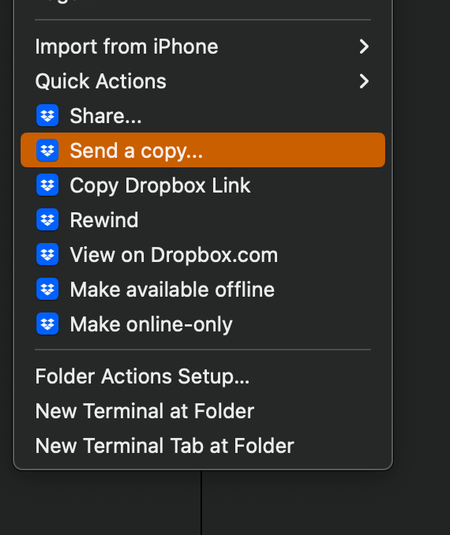
hello, Mac OS Ventura 13.0.1 (22A400) - when I right click on a folder and select "Copy Dropbox link" nothing is copied to the clipboard. I have restarted Finder, restarted the machine, reinstalled ...


Gr8sons
3 years agoHelpful | Level 5
Like several others, including myself, have described the Dropbox menu opens and the options appear but when clicking on the Copy Dropbox Link nothing is copied into the Clipboard: it's either empty or whatever was previously copied in any other context remains.
To further clarify, all of the files are properly uploaded to Dropbox and I can create/copy a link from a browser. Like everyone else, I'd grown accustomed to being able to do it from the desktop without the additional steps/hassle of logging in via a browser.
Re the auto-launch option. I've deselected, then restarted, then reselected, then restarted the Start Dropbox on system startup. No joy. And this is after several delete/reinstall cycles for the app itself. Having to manually launch the Dropbox app is less of a hassle, however, than the missing Copy Dropbox Link function.

Megan Dropbox Community Moderator
3 years agoDropbox Community ModeratorHi Gr8sons, I hope you're doing well!
Can I send you an email, in order for us to have a closer look into this?
- Gr8sons3 years agoHelpful | Level 5
Of course
 The Cakewalker2 years agoExplorer | Level 3
Hello!
Same issue here on one of my two Mac Minis.
Mac Mini 2018 (Intel).
Ventura 13.6.
Dropbox app 183.4.7058.
Thanks for any idea...
- Walter2 years ago
Hey The Cakewalker, thanks for letting us know about this.
If this persists after rebooting your computer, could you send us a screenshot of the options you get when you right/control click on your files in the Dropbox folder?
Also, where's the Dropbox folder located as per the sync tab In the app's preferences?
- The Cakewalker2 years agoExplorer | Level 3
Hello Walter!
Thanks for your reply.
The location of the Dropbox folder is the new default:
/Users/(UserName)/Library/CloudStorage/Dropbox
Best!
- Hannah2 years ago
Thanks for the screenshot, The Cakewalker!
Can you try to give Dropbox full disk access, to see if that helps at all?
- The Cakewalker2 years agoExplorer | Level 3
Hello Hannah!
Thanks for answering and suggesting the full disc access option.
Having 2 additional Macs here - both without any Dropbox issue - I checked that setting before.
None of them has full disc access for Dropbox or any other app.
But I tryed nevertheless.
Setting full disc access, restarting Dropbox and in addition the Mac.
No success...
The Mac having the issue was the first migrated to the new Dropbox system.
At that time with older versions of Ventura and Dropbox.
Havent tryied "Copy Dropbox Link" for a while on that Mac.
So maybe the issue persists since the migration.
Best regards!
- Megan2 years ago
Hi The Cakewalker, can I please send you an email, in order for us to have a closer look into this?
- The Cakewalker2 years agoExplorer | Level 3
Hello Megan!
Yes, you are welcome.
Best!
- Gr8sons2 years agoHelpful | Level 5
FWIW I've been fighting this issue since first reported last February. Despite attempting every fix suggested by Dropbox, I've finally resigned myself to this feature not working.
Interestingly, it works if I force the configuration back to the NON Dropbox-is-nested-in-iCloud-folder. But that promptly triggers a warning from Dropbox that I don't have it configured correctly and will soon be disabled.
Since I don't need to copy a Dropbox link very often, my workaround is to use a browser to navigate to my Dropbox account and copy the link from there. This at least is reliable.
- Megan2 years ago
 fetsja1 year agoNew member | Level 2
Hi Megan,
Meanwhile, is there a solution to this [copy dropbox link] issue?
gr. Stef
- windwisher1 year agoNew member | Level 2
In my case, dropbox had flagged a file as malicious and that is why my ability to share a link was disabled. Dropbox support identified the file and I removed it so they reinstate my ability to create a shared link. All has been working fine since then.


About Create, Upload, and Share
Find help to solve issues with creating, uploading, and sharing files and folders with Dropbox.
The Dropbox Community team is active from Monday to Friday. We try to respond to you as soon as we can, usually within 2 hours.
If you need more help you can view your support options (expected response time for an email or ticket is 24 hours), or contact us on X, Facebook or Instagram.
For more info on available support options for your Dropbox plan, see this article.
If you found the answer to your question in this Community thread, please 'like' the post to say thanks and to let us know it was useful!


