We’re Still Here to Help (Even Over the Holidays!) - find out more here.
Forum Discussion

epco
4 years agoCollaborator | Level 9
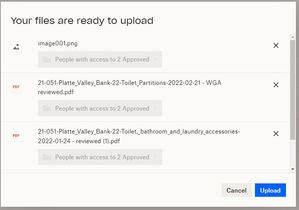
Can we remove the "Your Files Are Ready To Upload" message?
Another "update" that makes a process longer for my team. Now when we drag and drop from Outlook to the web version of Dropbox we get the message shown below "Your Files Are Ready To Upload" which r...

Hannah Dropbox Community Moderator
4 years agoDropbox Community ModeratorHey epco, thanks for taking the time to post to our Community.
At the moment, this prompt cannot be removed, however, we really appreciate your feedback about this.
I will make sure your comments are passed along to our team.
In the meantime, you can always use our desktop application as a workaround, since it's our preferred method of uploading files.
Let me know if you have any questions.
- epco4 years agoCollaborator | Level 9
Thanks for response. I don't know why any update would make an existing process more complicated. The desktop app has syncing issues and we prefer to drag and drop to online as it's easier to ensure the files are uploaded. Please make sure your team hears my feedback.
Thanks again.
- epco3 years agoCollaborator | Level 9
Any chance this need to press the upload button gets sunset anytime soon? I just don't see the benefit.
- Megan3 years ago
Hi epco, happy Thursday!
Unfortunately, I don't have further info on this, and whether it'll be removed or not.
We listen to your needs because it allows us to fully appreciate how Dropbox fits into and influences your daily routine. I'll definitely keep your comments in mind, and pass them to the relevant areas, so we can continue to improve.
Thanks!


About Create, upload, and share
Find help to solve issues with creating, uploading, and sharing files and folders in Dropbox. Get support and advice from the Dropbox Community.
The Dropbox Community team is active from Monday to Friday. We try to respond to you as soon as we can, usually within 2 hours.
If you need more help you can view your support options (expected response time for an email or ticket is 24 hours), or contact us on X, Facebook or Instagram.
For more info on available support options for your Dropbox plan, see this article.
If you found the answer to your question in this Community thread, please 'like' the post to say thanks and to let us know it was useful!


