Our Community is in read-only mode until April 8th, learn more here. You can still search existing threads or get help via Dropbox Support, the Dropbox Help Center, or Learn.
Forum Discussion

Lennard1
5 months agoExplorer | Level 4
Can we stop someone with access to a shared link from sharing it with other people?
Hi all,
I have a problem with a specific Dropbox setting. I know that what I want to do should be possible, but unfortunately, I can't figure it out. That's why I need your help. It's about the fol...

Hannah Dropbox Community Moderator
5 months agoDropbox Community ModeratorHey Lennard1, thanks for posting your question to our Community.
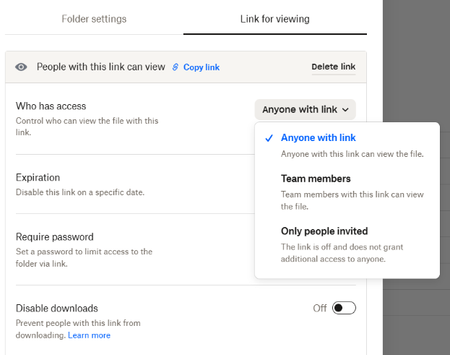
To get to the point, when it comes to sharing files with non-Dropbox users through shared links, we do offer ways for you to protect your links, such as password protection, disabling downloads for the links and adding an expiration date on them.
However, there's no way for us to stop someone who already has access to the link from passing it on to someone else.
I will pass your feedback along to the team, though, and you can read more about the shared link permissions and how to enable them here.
Let me know if you have any questions!
About Create, Upload, and Share
Find help to solve issues with creating, uploading, and sharing files and folders with Dropbox.
The Dropbox Community team is active from Monday to Friday. We try to respond to you as soon as we can, usually within 2 hours.
If you need more help you can view your support options (expected response time for an email or ticket is 24 hours), or contact us on X, Facebook or Instagram.
For more info on available support options for your Dropbox plan, see this article.
If you found the answer to your question in this Community thread, please 'like' the post to say thanks and to let us know it was useful!


