Our Community is in read-only mode until April 8th, learn more here. You can still search existing threads or get help via Dropbox Support, the Dropbox Help Center, or Learn.
Forum Discussion

Lennard1
5 months agoExplorer | Level 4
Can we stop someone with access to a shared link from sharing it with other people?
Hi all,
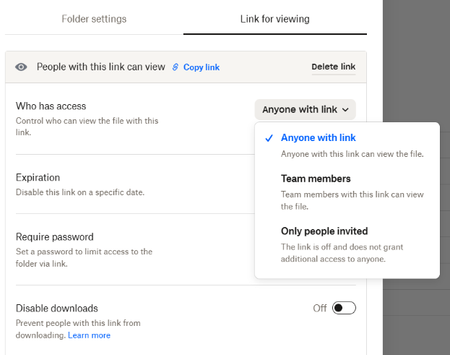
I have a problem with a specific Dropbox setting. I know that what I want to do should be possible, but unfortunately, I can't figure it out. That's why I need your help. It's about the fol...

Lennard1
5 months agoExplorer | Level 4
Hi Hannah,
Thanks for your quick reply. I know there is password protection, but when you enter a password you will be redirected from the client-page to an online-dropbox environment and that is ideally not what we want to happen. Disabling downloads is not something we want, as we need our clients to be able to download the files that are save din the folders. Same applies to adding an expiration date to a link (thus to a folder) as we want our clients to have access to the folder any time.
Would it be possible to remove the COPY LINK and OPEN IN DROPBOX icons from this screen? That would also help.
Kind regards,
Lennard
- Hannah5 months ago
Dropbox Community Moderator
Thanks for the clarifications, Lennard!
Does this window appear within Webflow?
- Lennard15 months agoExplorer | Level 4
Yes, this appears when selecting a folder on our client page that was created in Webflow.
- Hannah5 months ago
Since it's on a third-party website/service, there's no way to hide it from our end.
I'd suggest reaching out to Webflow for more info, in this case, Lennard.
- Rich5 months ago
Super User II
Lennard1 wrote:
Disabling downloads is not something we want, as we need our clients to be able to download the files that are save din the folders.
Keep in mind that if you're allowing your clients to download the files, then, ultimately, you can't prevent them from re-sharing the files. They can easily upload the files to their own Dropbox account, or any other platform, and create their own link.
Simply put, once you put a file anywhere on the Internet for a person to access, there's nothing you can do to prevent them from re-sharing it. Even with disabling downloads, a person can just screenshot the page or copy/paste the content if it's text, etc.


About Create, Upload, and Share
Find help to solve issues with creating, uploading, and sharing files and folders with Dropbox.
The Dropbox Community team is active from Monday to Friday. We try to respond to you as soon as we can, usually within 2 hours.
If you need more help you can view your support options (expected response time for an email or ticket is 24 hours), or contact us on X, Facebook or Instagram.
For more info on available support options for your Dropbox plan, see this article.
If you found the answer to your question in this Community thread, please 'like' the post to say thanks and to let us know it was useful!


