We're making some changes to the Dropbox Community 👩💻 - Find out more here.
Forum Discussion

kpmj
7 years agoHelpful | Level 5
Cannot open PowerPoint presentations from a shared folder on Dropbox
Hello,
I keep getting an error message (see below) when I try to open powerpoint presentations created by someone else in a shared Dropbox folder. I can open the ones I add to the folder. I disable...
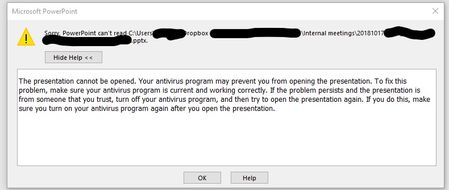
- 7 years ago
Thanks for the suggestions everyone, the issue was due to the antivirus software. Our IT guy played around with it and the issue is now resolved. Thanks once again!

Mark Super User II
7 years agoSuper User IISounds like actually the file folder directory is too long.
Windows has a limit on directories of about 250 characters (i.e. 'C:\My Documents' is 15). If it is longer than 250 then they cannot be opened.
Try renaming some of the files/folders to a shorter naming structure and you should find they open fine :)
kpmj
7 years agoHelpful | Level 5
Thanks for the suggestion, Mark. I will have to work with the person who created the folder to do that. I am just not sure why only I would have this issue when other people are also using the same files and they can open them just fine.
- Mark7 years ago
Its possible that the folder structure is very close to the limit on their machines, but, you are over ever so slightly due to a different name maybe (e.g. your My Documents folder name therefore being longer), or, just your Dropbox in a different location.
- kpmj7 years agoHelpful | Level 5
Thanks for the suggestions everyone, the issue was due to the antivirus software. Our IT guy played around with it and the issue is now resolved. Thanks once again!
About Create, Upload, and Share
Find help to solve issues with creating, uploading, and sharing files and folders with Dropbox.
The Dropbox Community team is active from Monday to Friday. We try to respond to you as soon as we can, usually within 2 hours.
If you need more help you can view your support options (expected response time for an email or ticket is 24 hours), or contact us on X, Facebook or Instagram.
For more info on available support options for your Dropbox plan, see this article.
If you found the answer to your question in this Community thread, please 'like' the post to say thanks and to let us know it was useful!


