Your workflow is unique 👨💻 - tell us how you use Dropbox here.
Forum Discussion

Jq1
6 years agoHelpful | Level 6
Cannot upload 20 min iMovie project or camera roll clip to drop box,
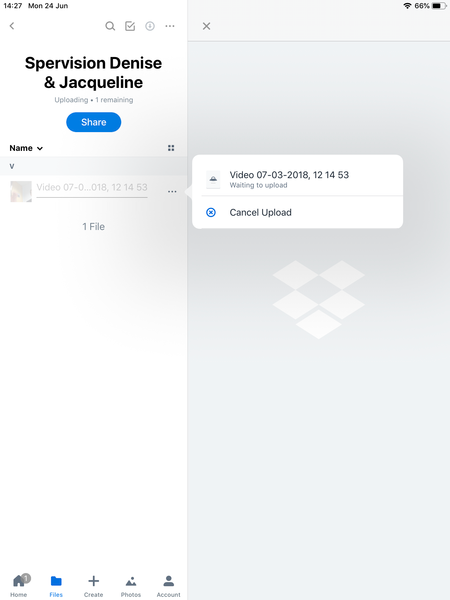
I cannot upload iMovie film to Dropbox although there is space . I followed various instructions but nothing works , I have a screen shot . Neither camera roll or preferred option ‘project’ work . ...
- 6 years ago
Yes it’s been resolved. First going into IOS settings App on iPad and scrolling down to Dropbox and checking in there that Photos and read and write are enabled( they were). And that background app refresh is on ( it was ).
next opening Dropbox app and Accounts (bottom menu), scrolling down to camera upload and checking its on( it wasn’t) then checking videos option is on after enabling camera upload( it wasn’t).
after this going to photos and seeing video is slowly uploading!
many thanks for the help and support!
Jq1
6 years agoHelpful | Level 6
This is screenshot of upload from iMovie project to droobix

Daphne Dropbox Community Moderator
6 years agoDropbox Community ModeratorHey Jq1, thanks for that screenshot!
Would you mind just trying to clear the app cache to see if this helps at all with the steps in the spoiler below:
Spoiler
1. Open the Dropbox app on your device.
2. Tap the Account tab.
3. Tap the gear icon in the top left corner.
4. Select the option to “Clear cache”.
After doing this, can you try manually uploading the video through the Dropbox app again using the “+” button along the bottom of the screen within the app.
Let me know how it goes - Thanks!
- Jq16 years agoHelpful | Level 6
Hi, I’ve done this and enclose screen shot, the same outcome after 10-15 mins nothing happening I’m afraid
- Daphne6 years agoHey Jq1,Would you mind if I reach out to the email address associated with your Community profile so that we can do some further investigation through our Support channel?Otherwise, if you’ve already submitted a ticket with our Support team, please feel free to let me know the ticket reference number (eg. #1234567) so that I can follow up there with the info you’ve provided here too.Let me know - Thanks!
- Jq16 years agoHelpful | Level 6
Thanks Daphne, go ahead. I haven’t submitted a ticket or contacted anyone else.
- Jq16 years agoHelpful | Level 6
Yes it’s been resolved. First going into IOS settings App on iPad and scrolling down to Dropbox and checking in there that Photos and read and write are enabled( they were). And that background app refresh is on ( it was ).
next opening Dropbox app and Accounts (bottom menu), scrolling down to camera upload and checking its on( it wasn’t) then checking videos option is on after enabling camera upload( it wasn’t).
after this going to photos and seeing video is slowly uploading!
many thanks for the help and support!


About Create, Upload, and Share
Find help to solve issues with creating, uploading, and sharing files and folders with Dropbox.
The Dropbox Community team is active from Monday to Friday. We try to respond to you as soon as we can, usually within 2 hours.
If you need more help you can view your support options (expected response time for an email or ticket is 24 hours), or contact us on X, Facebook or Instagram.
For more info on available support options for your Dropbox plan, see this article.
If you found the answer to your question in this Community thread, please 'like' the post to say thanks and to let us know it was useful!


