Your workflow is unique 👨💻 - tell us how you use Dropbox here.
Forum Discussion

Ted G.
6 years agoCollaborator | Level 8
Can't drag Files to Dropbox Folder in Catalina
Hello,
In catalina I am no longer able to drag files in finder into the dropbox folder. The selected object just sort of springs back into place and will not enter the Dropbox folder.

jbaltd
6 years agoHelpful | Level 5
:( quite frustrating.
The files just jump back.
HELP DROPBOX guys ... !! HELP
BrantInPaloAlto
6 years agoHelpful | Level 6
Did you grant DropBox full file access? Once I did that I could do the "move to dropbox" action. Drag and drop isn't working still but that helped me a lot.
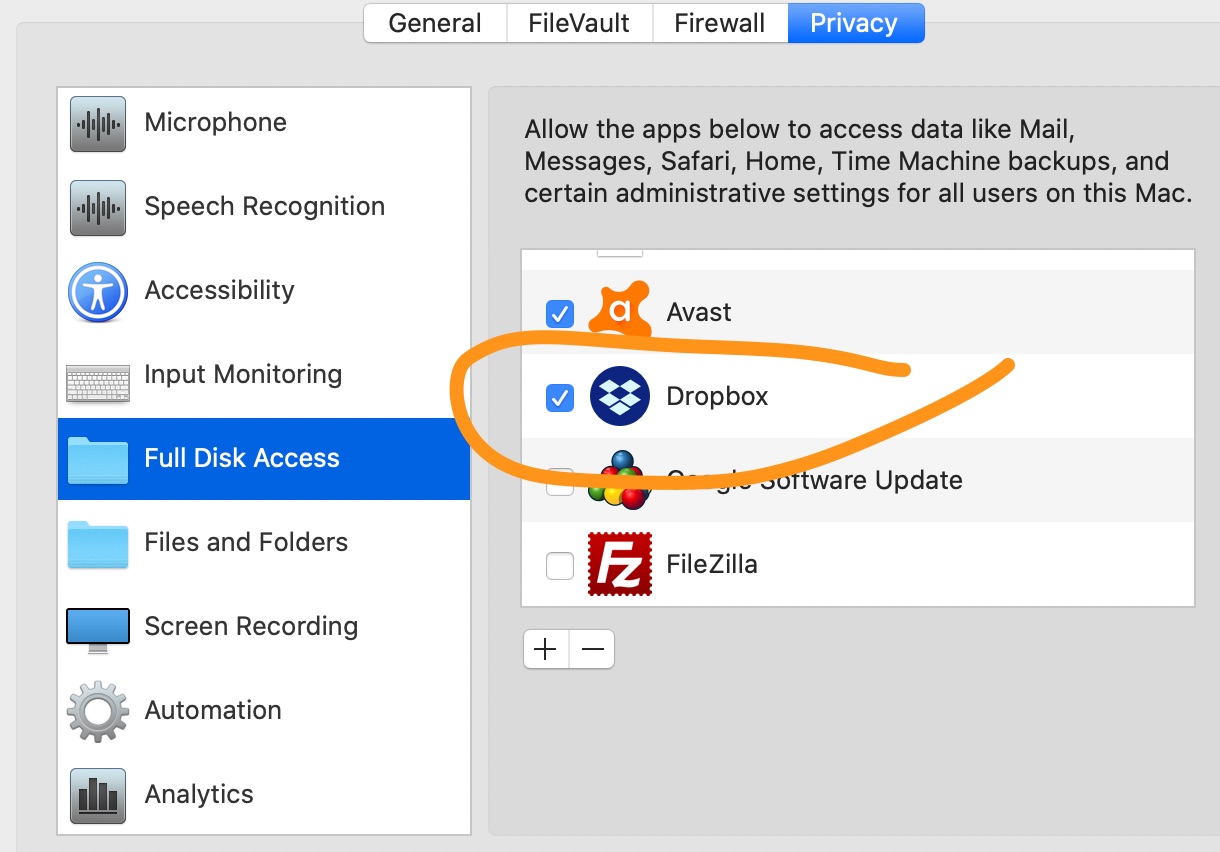
- Jane6 years ago
Dropbox Staff
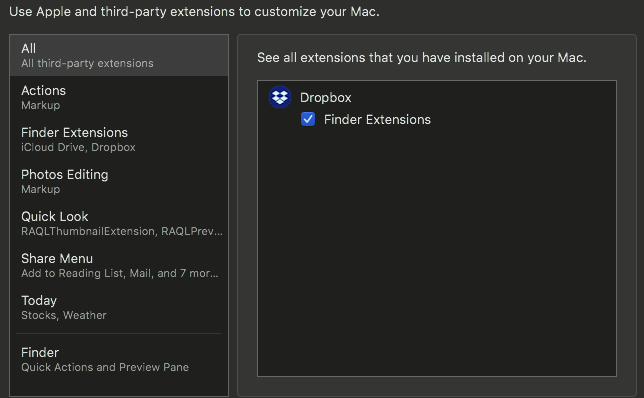
Hello again to everyone posting us on this thread on this discrepancy!Your reports have been very insightful & I’d like to thank everyone who took the time to write in about this. I haven’t been able to replicate on my end & I’ve been holding off this reply as I’ve been trying to understand whether there’s a common pattern affecting you all that could help us determine the best next steps.It would be great if you could check the following for me:#1. Is the Finder extension installed? To check this go to "System Preferences" and look for "Extensions". Look for an item called "Finder" in the side bar and click it. If the extension is installed you should see an entry for Dropbox.#2. Is the extension running? To check this, open "Activity Monitor". Once there use the search bar to look for "Dropbox". If the extension is running, you should see a white box icon called "Dropbox".#3. Does the Dropbox logo appear in the Finder side bar or is it just a plain folder icon? Also, please let me know if Dropbox is running and syncing correctly.Can you let me know if all of these requirements are met?Thanks again to all for keeping in touch; I'm looking forward to hearing back from with your findings &/or results! - Antonis_Pet6 years agoHelpful | Level 6In my case all four requirements are met.
 Ted G.6 years agoCollaborator | Level 8
- dragdropper6 years agoHelpful | Level 5
I didn't change anything but overnight the functionality returned to drag and drop. Elves or software engineers at work?
- BrantInPaloAlto6 years agoHelpful | Level 6
Not working for me as of 10:00 am PT on 10/24/19. I checked and I'm current on O/S updates.
- Sparrow16 years agoHelpful | Level 6
Yes. Extension is installed and running. Logo appears in sidebar. Problem persists.
- BrantInPaloAlto6 years agoHelpful | Level 6
Oh and it's only drag and drop to the favorites bar. If I open a new tab for dropbox I can drag/drop to that tab.
- jbaltd6 years agoHelpful | Level 5
Hi Jane,
all your requirements are met ... still can NOT drag files into the Dropbox :((((
Very puzzling and majorly frustrating.
Please help us.
THANK YOU,
joseph
- Bryan46 years agoExplorer | Level 4
.Just to add that I have this problem too, but not just with the top-level Dropbox folder - I'm also getting it with one (and just one) subfolder. I thought maybe it was because it's a shared folder, but other top level shares, and folders nested within the problem folder, aren't affected.
- Jane6 years agoI appreciate your efforts & ongoing cooperation; you’ve all been very insightful!I’ve now created individual tickets for all of you that posted us since yesterday separating your reports & I’d like to work with you individually moving forward. If you have some spare time, please check your inbox & we’ll continue troubleshooting that from where we’ve left off here.(Note: I accidentally created a ticket for you as well dragdropper; feel free to ignore it, as this has been sorted in this case.)Enjoy your Friday until we talk again!
- BrantInPaloAlto6 years agoHelpful | Level 6
I've given you a lot of time already by helping define the problem clearly. You have several people with the same issue so it's clearly not some one off thing. Ball is in dropbox's court now to fix it. If you'd like me to check at any point if things are working after you make fixes I'm glad to do that though but please don't engage with me directly beyond that.
- anonymous6 years ago
agreed. behavior has been cleary defined—no drag/drop into the dropbox icon in macos 10.15.x Finder sidebar. I'm now on 10.15.1 beta 2 and the bahavior occurs on the three machines I currently have running macos 10.15.x.
opening a seperate window works, dragging into any other folder placed in side bar works: only dropbox in sidenbar does not work.
- dragdropper6 years agoHelpful | Level 5
Whatever was fixed became unfixed and now I need help dragging from desktop or anywhere to Dropbox.
- Jane6 years ago
Hey dragdropper, the ticket is still active on our system, so if you reply back to me, this is going to end up in my inbox!
- wanyulee6 years agoNew member | Level 2
Same problem here. Extension is installed and running. Logo appears in sidebar.
macOS 10.15.1
- Fiona6 years ago
Hey stationagent and wanyulee, thanks for your paticipation.
Since you've already tried the troubleshooting steps offered here, please create a ticket with us and get back to us with your ticket numbers.
Thank you for your patience.
- payleinad6 years agoNew member | Level 2
Hi, I'm having the same issue while running macOS 10.15.1 and Dropbox 85.4.155. I've already checked that the logo appears in the sidebar as well as made sure the extension is installed and running. Additionally, I've tried restarting my computer and reinstalling Dropbox.
- MisterShifter6 years agoNew member | Level 2
Seriously considering switching to iCloud Drive from Dropbox unless they can sort this out. It's pretty annoying.
- Jane6 years agoHey payleinad & MisterShifter, thanks for the nudge!We can work on that via ticket, so I’ve just sent you a brief message through our support system & once you reply back to me we can take it from where we left off here.Have a nice day & I’ll be awaiting your replies!
- Sparrow16 years agoHelpful | Level 6
Hi Jane, I haven't seen a ticket come through.
- John486 years agoNew member | Level 2
Hi all...
I found this thread as I have the exact same drag/drop issue as described by everyone. I did notice one behavior that helps a little. If I drag and drop a file to Dropbox...but do not immediately drop it...instead hold it for a couple seconds hovering over the Dropbox icon until the Finder window changes to show your Dropbox folder. Then drop it into a Dropbox folder of yoiur choice and it works.
This isn't a perfect solution for a couple reasons - but seems to be a little better.
 donawalt6 years agoCollaborator | Level 9
Just found this thread, same problem for me too.
- RDFRush6 years agoExplorer | Level 4
Also having the same issue
- Sparrow16 years agoHelpful | Level 6
Hi Jane,
Do you mean my email inbox for that address?
I see I received an email with an invite to Zendesk. Log in doesn't work. Do I need to create a new account?




About Create, Upload, and Share
Find help to solve issues with creating, uploading, and sharing files and folders with Dropbox.
The Dropbox Community team is active from Monday to Friday. We try to respond to you as soon as we can, usually within 2 hours.
If you need more help you can view your support options (expected response time for an email or ticket is 24 hours), or contact us on X, Facebook or Instagram.
For more info on available support options for your Dropbox plan, see this article.
If you found the answer to your question in this Community thread, please 'like' the post to say thanks and to let us know it was useful!


