Need to see if your shared folder is taking up space on your dropbox 👨💻? Find out how to check here.
Forum Discussion

ajbentley
8 years agoExplorer | Level 3
Can't switch to online only
I've got a file that's pretty big and I've put it up to dropbox with selective sync. The original version of the file is on an external hard drive. When I switched the dropbox folder to online only (click the grey cloud) it doesn't switch and it has now downloaded the contents of the folder onto this machine and it's taking up all of my space.
Any ideas?
Thanks,
Joshua
Hey there ajbentley - sorry to hear about this; let's take a look now.
When using Selective Sync, and choosing to sync a folder you had previously excluded on the desktop client, you may notice the files appearing with a grey cloud icon beside them. This means that the files are ‘online-only’. You can see and interact with these files as normal, but they take up practically no space on your computer.
Through our Smart Sync feature you now have greater control and can sync only the folders or files you need by right clicking, choosing Smart Sync and then selecting 'Local'. This helps optimize your hard disk usage.
Once we have returned these 'online-only' files/folders through Selective Sync you can now see the files and folders and then proceed with re-downloading only the content you need and want.
If a file has been synced locally that you would prefer to have online-only, simply right click on it and select online-only from the Smart Sync menu.
Let me know how this goes Joshua.

32 Replies
Replies have been turned off for this discussion
- translateltd546 years agoHelpful | Level 5
I seem to have got it stable now, but it's taken some work. If I copy anything out of the online-only file, it starts downloading *everything* to my HD again, so I have to make sure that folder is excluded from whole-drive backups to an external HD, for example.
- 51m0n6 years agoNew member | Level 2
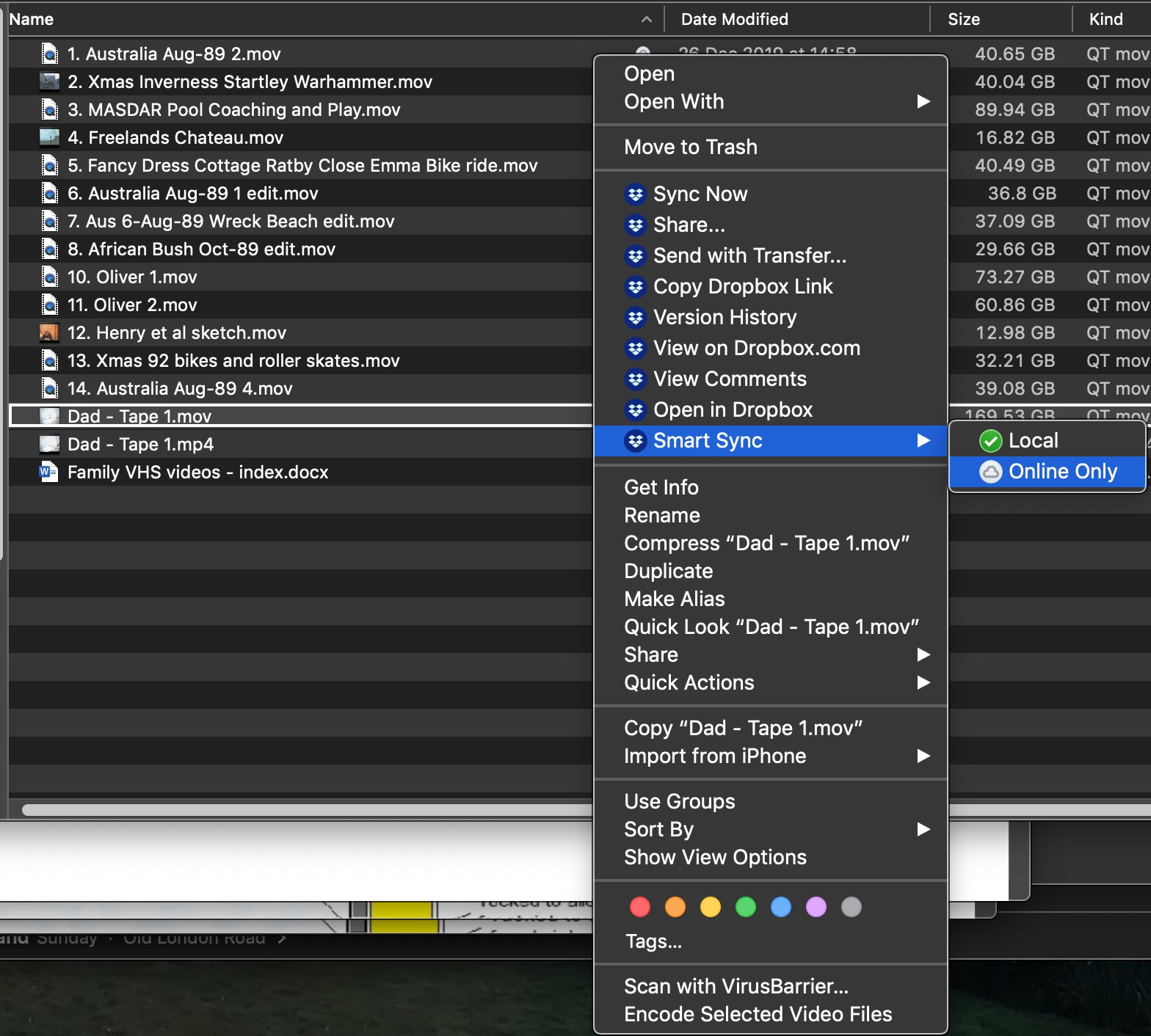
I am moving VHS video content on to my Mac. This is creating very large files which I am then individually selecting to be online only. This has been working well until now. However, with the latest file I have converted from VHS, Dropbox won't let me select 'Local' or 'Online Only'. I can go through the process of selecting 'Online Only' (see below)
but my selection does not 'take' and neither 'Local' or 'Online Only' have a tick beside them. Currently Dropbox is telling me that it is downloading the file having just spent 11 hours syncing it with Dropbox!
Help!
- 51m0n6 years agoNew member | Level 2
This problem has sorted itself out. After the file uploaded to Dropbox (11 hours!), Dropbox then seemed to need to download it again to complete the sync process (?). I was trying to select 'Online Only' when the sync was still in process (ie I had the two arrows on a blue circle) so I think that's why it wouldn't take immediately.
- Xander6 years agoNew member | Level 2Galatea57! My saviour!
But what a stupendous thing that you need to enable this option after installation while you already select To enable it during installation!  zj6 years agoNew member | Level 2
It doesn't work. Cant switch content to online only. clicking but it just keeps reverting to local. Any advice would be greatly appreciated.
- Lusil6 years ago
Dropbox Staff
Hey zj, thanks for nudging us on this thread.
If you have files that are being set to local instead of online-only, you can have a look at this article which gives some additional info on the matter.
Check it out and let me know if you have any other questions. Thanks!
 jlchambe776 years agoNew member | Level 2
Switching to online only worked for my other computer, but on this one, it does not give me the option on "online only", it only have "Local". What to i need to change on my computer to fix this?
- jlchambe776 years agoNew member | Level 2SpoilerNever mind, I fixed it by going into Drop box preferances, and going though the steps to activate sync.
- DumbSync6 years agoNew member | Level 2
Lusil wrote:Hey zj, thanks for nudging us on this thread.
If you have files that are being set to local instead of online-only, you can have a look at this article which gives some additional info on the matter.
Check it out and let me know if you have any other questions. Thanks!
It is absolutely extraordinary that one needs to read this article in order to keep files online only. We all use back-up. I have now excluded my DB folder from CCC and TimeMachine -- but it remains impossible to select Online Only.
OS X latest.
What is the meaning under preferences of "Let my admin manage this setting" ? I am my admin and can manage nothing if this setting is on or off.
AB
- Lusil6 years ago
Hi DumbSync, thanks for reaching out to us.
If you're part of a Business team, the team admin can have can manage the Smart Sync settings for their teams.
Although this might be the case, team members can change their device settings to a different default at a later point in time.
Hope this helps.

About Create, upload, and share
Find help to solve issues with creating, uploading, and sharing files and folders in Dropbox. Get support and advice from the Dropbox Community.
The Dropbox Community team is active from Monday to Friday. We try to respond to you as soon as we can, usually within 2 hours.
If you need more help you can view your support options (expected response time for an email or ticket is 24 hours), or contact us on X, Facebook or Instagram.
For more info on available support options for your Dropbox plan, see this article.
If you found the answer to your question in this Community thread, please 'like' the post to say thanks and to let us know it was useful!


