Your workflow is unique 👨💻 - tell us how you use Dropbox here.
Forum Discussion

suibom
2 years agoHelpful | Level 5
Can't understand the meaning of the Dropbox icon in the finder and it doesn't sync.
My system info
HW: Apple M1 Pro
OS: Ventura 13.5 (22G74)
Dropbox ver: v180.3.4837 & joined beta
Dropbox beta has an incomprehensible behavior when using the file provider feature on macOS...
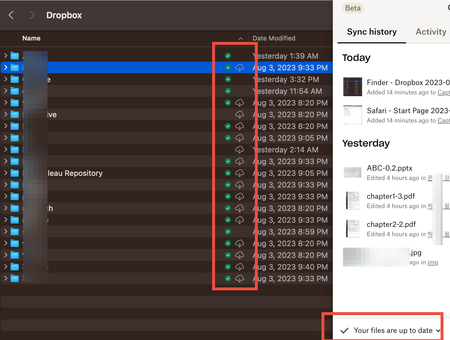
- 2 years ago
The previous article described the icons you would see in Finder.
- The green sync icon means the file is available offline
- No icon means it's 'available'. This means you doubleclicked it to open, and it's stored on your computer. However, if you're low on hard drive space, the Mac OS will delete the local copy to free up space
- Cloud icon with a down arrow means it's online-only.
- This would only apply to entire folders. Individual files won't have two icons at the same time.


daviddaviddavidgardener
1 year agoExplorer | Level 4
yeah im on osx 13.5 and dropbox says "your files are up to date"

Nancy Dropbox Community Moderator
1 year agoDropbox Community Moderatordaviddaviddavidgardener, are these files saved within a folder? If yes, what syncing icon do you see next to the parent folder?
If you right click on it, do you see the “make online-only” option instead of “make available offline”, or neither of them shows in the menu?
- daviddaviddavidgardener1 year agoExplorer | Level 4
The parent folder has the cloud with a down arrow, I see both options to "make available online only" as well as "make available offline" , but clicking make available offline doesn't do anything.
- Nancy1 year ago
Thanks for the screenshot! If you open the folder and press Command A to select all files within, do you see the “make available offline” option then?
If you select it, does anything change?
- daviddaviddavidgardener1 year agoExplorer | Level 4
hey, yes the option to “make available offline” is still visible when all are selected. but when I click that - nothing happens. Any idea why this is happening?
- Walter1 year ago
Thanks for the screenshot daviddaviddavidgardener
Could you please clarify the app's version as well for me? Also, what is the location of your Dropbox folder as per the sync tab in the app's preferences?
Did you install the app with admin privileges and grant Dropbox full disk access?
- daviddaviddavidgardener1 year agoExplorer | Level 4
yes its installed properly and i have only had issues since its migration to the new location on mac. Version 204.4.5420
It was installed with admin privileges and full disk access
- Nancy1 year ago
daviddaviddavidgardener, can we log a ticket for you at this point and look into this internally?
- daviddaviddavidgardener1 year agoExplorer | Level 4
yes please. how do we do that?
- Walter1 year ago
Just let us know that you're OK with us reaching out via email and we'll use the email address that's linked to your profile here, on our Community daviddaviddavidgardener
- daviddaviddavidgardener1 year agoExplorer | Level 4
yes please reach out to my email. thanks
- Nancy1 year ago
Check your email when possible, daviddaviddavidgardener, and reply back to me. Cheers!
 Seb Bruen1 year agoNew member | Level 2
Hi there,
I'm having exactly the same issue and cant resolve it. Are you able to raise a ticket with me also?
S
- Seb Bruen1 year agoNew member | Level 2
Also, now its located in the CloudStorage folder, is this taking up space on my icloud as well as dropbox? Why the 2 logos?
The multiple (dropbox & macOS) logos are very confusing. Very frustrating and the re-syncing has now massively slowed my work down.
- Seb Bruen1 year agoNew member | Level 2
Is it possible to revert?
- Megan1 year ago
Hey Seb Bruen, let's jump right into this!
Would you mind clarifying your OS at the moment?
Also, is your situation the same as the OP's or someone else? Feel free to share some details with me.
As for reverting back to the old version of the app unfortunately, this is not possible.
The updated Dropbox for macOS on File Provider experience was developed to adhere to the requirement as set out by Apple and to ensure the best possible experience for our Mac users long into the future.
Keep me posted, and we'll take it from there!
 CorpVis1 year agoNew member | Level 2
I've been having the same issue for months, click on one or more files to be available offline, it generates the green tick but still has a cloud icon next to it and the file is not available. I have to manually click the cloud icon and then it starts to download the content, but if i click on another file then it stops the previous one from downloading. As I run a video production company its very frustrating as i may need several videos at once and the files are heavy, so I spend a long time doing this one by one and waiting for previous request to finish. I'm using Macbook Pro with M3 Pro chip, and running currently macOS Sonoma 14.5.
- tdre1 year agoExplorer | Level 3
Also having these exact issues.
Make files available online starts a dropbox sync that never finishes (also can not preview which files are syncing).
It then gives green checkmakrs, but apple cloud icon is also there. I then have to click those to actually make the files available, which sometimes doesnt even work.
m1 pro macbook, sonoma 14.6.1
The suggested and "approved" fix in this topic doesnt actually work, and its a bit misleading tbh


About Create, Upload, and Share
Find help to solve issues with creating, uploading, and sharing files and folders with Dropbox.
The Dropbox Community team is active from Monday to Friday. We try to respond to you as soon as we can, usually within 2 hours.
If you need more help you can view your support options (expected response time for an email or ticket is 24 hours), or contact us on X, Facebook or Instagram.
For more info on available support options for your Dropbox plan, see this article.
If you found the answer to your question in this Community thread, please 'like' the post to say thanks and to let us know it was useful!


